Optimizing Skills and the Token Budget
Note: This space moves fast. The limits, budgets, and behaviors described here were accurate at publication, but they may have changed since. Treat the specific numbers as a snapshot and confirm against the current Claude Code and Codex docs before relying on them.
Introduction
If you’ve been building agent skills you’ve probably hit the moment where you wrote a genuinely good skill, asked for exactly the thing it was built for, and the agent just ignored it. Or maybe this is happening to you and you don’t even realize it.
This post breaks down two things: how an agent decides to fire a skill, and the token budget that quietly governs the whole registry. Get those two right and your invoke rate jumps. Get them wrong and skills disappear without a single error message.
The concepts here apply to both Claude Code and Codex, because they implement the same Agent Skills open standard. The mechanics are the same; only the numbers differ.
TL;DR
- The agent only sees a skill’s name and description when it’s deciding whether to fire it. Treat the description as the whole pitch.
- The description has to resolve to one line. A stray newline or the wrong YAML can make a skill silently vanish from the list.
- Don’t put
claudeoranthropicin a skill’sname. They’re reserved words. - All your skills’ descriptions share one ~2% slice of the context window between them (combined, not 2% each). Exceed that total and the registry truncates or drops skills, so the agent loses the keywords it needs to match.
- Fix it by shortening descriptions, slimming
SKILL.md, pushing detail intoreferences/, and scoping skills per project. - Measure, don’t guess. Tools like the Tessl skill-optimizer, Anthropic’s Skill Creator, and skill linters exist because eyeballing this is not optimal. You need dedicated optimizers that also perform evaluation runs to test invoke rates.
Two Ways a Skill Fails
There are two common failure modes, and they need different fixes:
- It doesn’t trigger. The skill is installed and visible, but the agent never picks it. This is a description problem.
- It silently disappears. The skill never makes it into the list the agent chooses from. This is a budget (or formatting) problem.
People burn hours debugging the second as if it were the first. Let’s take them in order.
Part 1: Make Skills Actually Fire
The Description Is the Whole Pitch
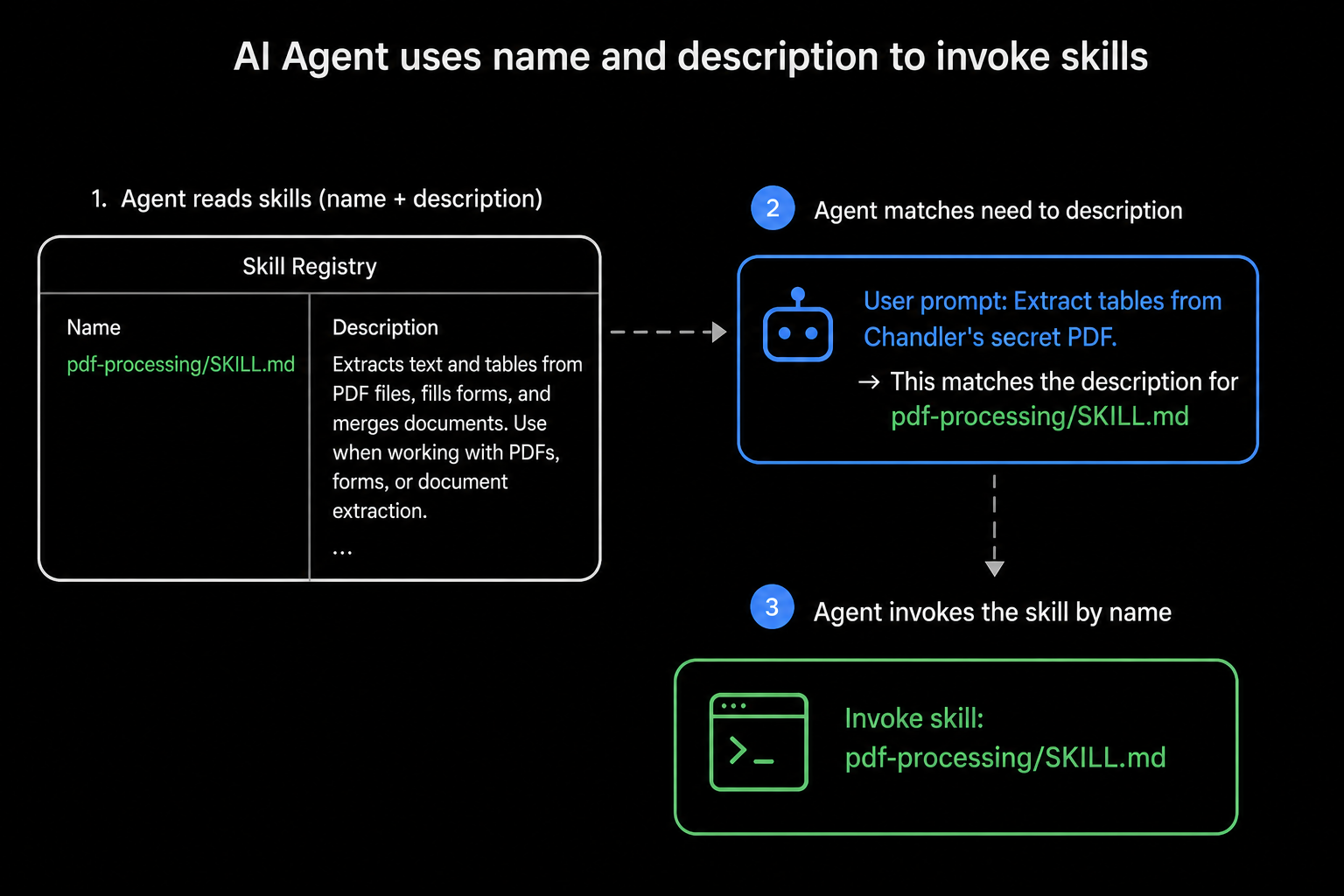
Here’s the reframe: at startup, the agent does not read your skill body. Both Claude Code and Codex use progressive disclosure. They preload only each skill’s name and description, and they read the full SKILL.md only after deciding to use it (Claude, Codex).
So the title and description aren’t metadata. They’re the only information the agent has when it decides whether your skill is relevant. If the trigger isn’t in there, the skill doesn’t fire.
A good description says what it does and when to use it, in the third person, packed with the words a user would actually type:
1
2
3
4
5
# Weak: the agent has nothing to match on
description: Helps with PDFs

# Strong: capability + explicit triggers + keywords
description: Extracts text and tables from PDF files, fills forms, and merges documents. Use when working with PDFs, forms, or document extraction.
Anthropic’s own guidance is blunt about this: write in the third person (“Extracts…”, not “I can help you…”), be specific, and include the trigger contexts (best practices). Codex says the same in its own words, “explain exactly when this skill should and should not trigger,” and front-load the key use case, because if descriptions get shortened, the front is what survives (Codex skills).
Tip: Front-loading is a survival strategy, not just style. When the budget gets tight (Part 2), the end of your description is what gets cut. Put the make-or-break keywords first.
The Single-Line Gotcha That Hides Skills
This one’s sneaky and cost my team real time. The description has to resolve to a single line. YAML frontmatter is fussy about multi-line strings, and getting it wrong doesn’t throw an error. The skill just quietly drops out of the list.
The trap is the literal block scalar (|). It preserves your line breaks, and the parser can hand the agent a mangled description, sometimes literally just the | character. There’s a logged bug for exactly this (claude-code#12971). Two safe ways to write it:
1
2
3
4
5
6
7
8
9
10
11
12
# Option A: bulletproof, a quoted one-liner
description: "Extracts text and tables from PDF files. Use when working with PDFs or forms."

# Option B: write across lines, but FOLD them into one with >-
description: >-
  Extracts text and tables from PDF files.
  Use when working with PDFs or forms.

# DON'T: the literal block (|) keeps the newlines and can break discovery
description: |
  Extracts text and tables from PDF files.
  Use when working with PDFs or forms.
The >- (a folded block scalar, with the dash to strip the trailing newline) lets you keep things readable in your editor while YAML collapses everything into one line on load. It’s the fix you want for long descriptions.
Naming: Kebab-Case and Reserved Words
Two quick rules that quietly affect whether a skill registers cleanly:
- Names are lowercase letters, numbers, and hyphens (
pdf-processing, notpdfProcessingorpdf_processing), max 64 characters. If a tool “normalizes” your name, this is what it’s doing: turningmyCoolSkillintomy-cool-skillso it’s spec-valid. An out-of-spec name is one more way to weaken matching, which is why cleaning it up tends to improve invocation. Note that it’s kebab-case (hyphens), not snake_case, underscores aren’t allowed. - Don’t use
claudeoranthropicin the name. They’re explicitly reserved. Soclaude-helperis out;commit-helperis fine.
Anthropic also suggests gerund-form names (processing-pdfs, analyzing-spreadsheets) for a consistent, scannable library. Nice to have, not required.
Don’t Tune Blind, Measure
You can’t eyeball invoke rate. The same description can fire nine times out of ten on one phrasing and twice out of ten on another. That’s why a small ecosystem of optimization tooling exists, and it’s worth knowing it’s broader than any one product:
- Tessl skill-optimizer runs a review → eval → improve loop. It scores a skill, generates test scenarios, runs the agent with and without the skill, and measures the delta. Great for “is this change actually better?”
- Anthropic’s Skill Creator is the official interactive builder, and it ships a separate description improver aimed squarely at triggering accuracy.
- Skill linters (for example, the Skill Linter on MCP Market) enforce the agentskills.io spec: frontmatter limits, directory structure, line counts, and token-wasting junk like ASCII art or “you are a 10x engineer” persona fluff.
Pick whatever fits your stack. The point isn’t the brand, it’s that you’re testing invocation instead of assuming it. Even when the agent wrote the skill for you, run it through something before you trust it.
Claude Code vs Codex: In Claude Code you force a skill with
/skill-name; otherwise it fires automatically by description match. In Codex you force one with/skillsor a$mention; otherwise it’s the same implicit, description-driven match. Same model, different keystroke.
Part 2: The Token Budget
Now the second failure mode, the one that feels like a bug.
Why the Budget Exists
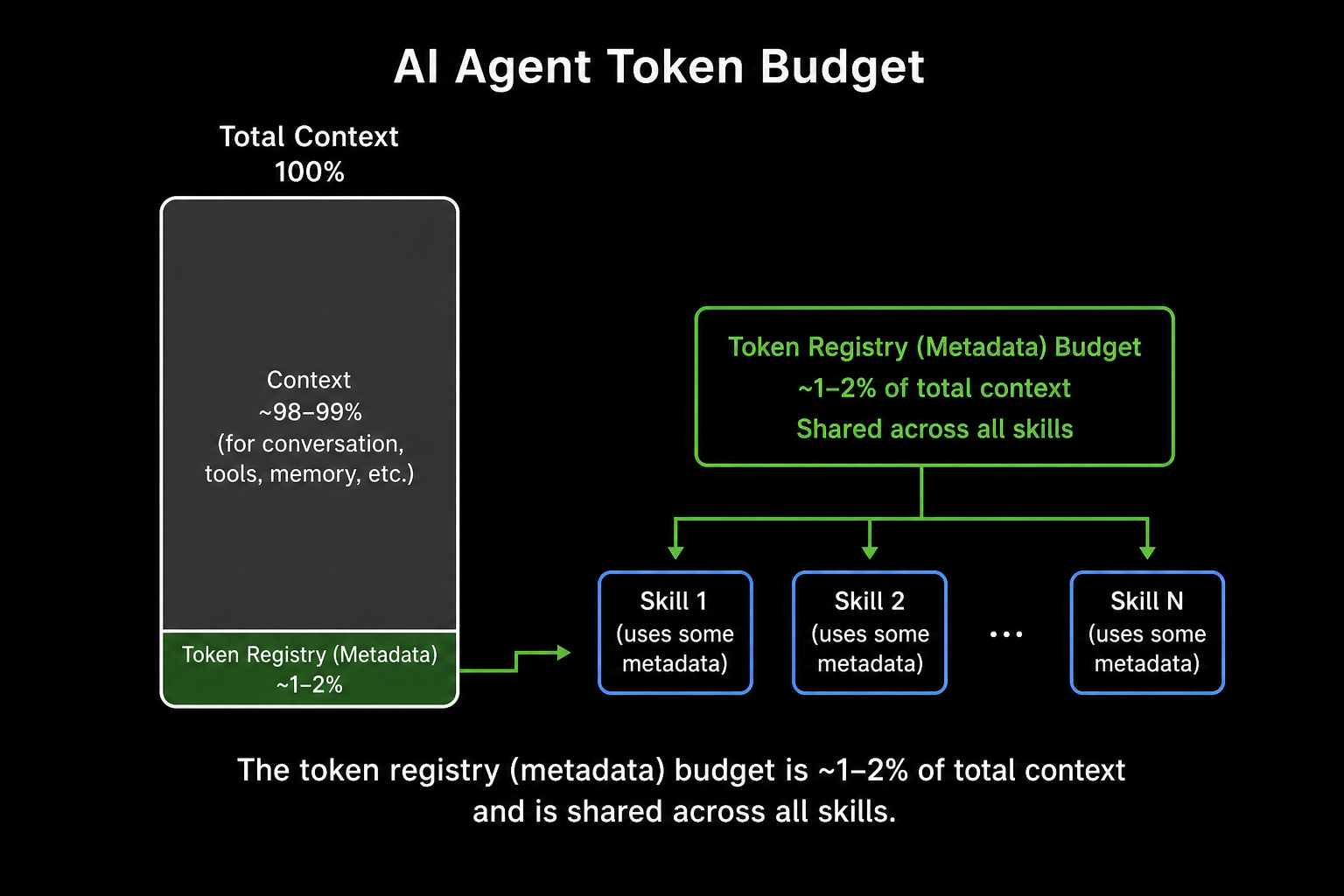
Remember progressive disclosure: every installed skill’s name and description gets preloaded into context at all times so the agent knows what’s on the menu. That menu isn’t free. To stop a big library from eating your whole context window, the platform caps the combined size of all that metadata.
That cap is roughly 1 to 2% of the context window, shared across every installed skill and plugin, a number the community write-ups and the official Codex docs both land on (Pere Villega, Codex). Because it’s a slice of the window’s total size, the bigger the window you run, the more metadata room you get (more on that below).
What Happens When You Blow Past It
This is the important part. When the sum of all your descriptions exceeds the budget, the registry truncates or silently drops skills. The agent loses the keywords it needed to match, so skills that worked last week just quietly stop firing. No error. They simply stop appearing as options.
If you’ve ever thought “this skill used to work and now the agent ignores it,” this is usually why. You didn’t break the skill, you ran out of budget, and it fell off the menu.
The Hard Limits
| Claude Code | Codex | |
|---|---|---|
| Per-description max | 1024 characters | 1024 characters |
| Name max | 64 characters | 64 characters |
| Registry (metadata) budget | ~1 to 2% of context, shared across all skills | ~2% of context, or ~8,000 chars when the window is unknown |
SKILL.md body | under ~500 lines recommended | full body loaded only when selected |
| Always-on instructions file | CLAUDE.md | AGENTS.md (32 KiB / ~8k tokens cap) |
| Force a skill | /skill-name | /skills or $mention |
The first two rows match on purpose: the 64-character name and 1024-character description caps come from the shared Agent Skills spec that both tools implement, not from Claude alone. Codex doesn’t restate them in its own docs; it leans on the ~8,000-character list budget (next row) as the cap that bites first.
Sources: Claude best practices, Codex skills, Codex AGENTS.md.
Two practical takeaways from that table.
1024 is a ceiling, not a target. Once your full library’s installed, push descriptions well under it. A good working goal is to keep each description near the ~1,000-character mark or lower, and if skills start dropping, keep trimming. Front-loaded keywords (Part 1) make short descriptions hurt less.
The body is a separate, sneakier cost. That “under 500 lines” for SKILL.md is a recommendation, not a hard limit, but it matters, because the entire body loads into context every time the skill fires. A bloated body wastes tokens and dilutes the model’s attention enough that instruction-adherence drops. The fix is the same on both platforms: keep SKILL.md thin and fatten references/. Reference files cost zero tokens until the agent actually opens one.
Tip: Keep references one level deep from
SKILL.md. If a reference links to another file that links to another, the agent tends to preview fragments instead of reading complete files.
1
2
3
4
5
6
pdf-processing/
├── SKILL.md          # thin overview + when-to-use; links straight to the files below
└── references/
    ├── forms.md      # loaded only when the task involves forms
    ├── extraction.md # loaded only when extracting text or tables
    └── api.md        # the full API reference, loaded on demand
When Shrinking Descriptions Isn’t Enough
Trimming text is the first lever, not the only one. If you’re still over budget, or just want a healthier library, reach for these:
- Selective enablement (scope skills to the work). You rarely need your entire library active at once. Both tools let skills live at project scope or personal/global scope (Claude:
.claude/skills/vs~/.claude/skills/; Codex: repo.agents/skillsvs$HOME/.agents/skills). Keep a project’s skills to the ones it actually needs and you spend the shared budget only on relevant skills. - Collapse related skills into one. Instead of fifteen narrow skills, consider one skill whose body handles the “when to use” routing and whose variants live in
references/. Example: a singleinjectionskill, with SQLi, template, command, and LDAP write-ups as reference files it pulls in on demand. One description on the menu instead of fifteen, if you can write a body that routes cleanly. Worth prototyping, not a blanket rule. - Prune the dead weight. Be honest about which skills you actually invoke. A skill you never fire is still paying rent in the budget. Consider deleting it.
- Use a bigger context window. The budget is a percentage of the window’s total size, fixed at startup, so it scales with the window you run, not with how much of the session you’ve already used. A larger window literally buys more metadata room: Claude’s 1M-token window gives about 5x the room of the standard 200K (2% of 1M vs 2% of 200K). So when a lot of skills need to load and descriptions start getting truncated, switching up to the bigger window is the cheapest fix on the list, and you should probably be defaulting to it anyway.
Note: If you’re genuinely overloaded, “just rely on manual invocation with shorter descriptions” won’t save you. Overloaded metadata degrades context for everything, not only auto-firing. Fix the budget first.
The 60-Second Checklist
Before you ship a skill, on either platform:
- Description says what it does and when to use it, third person, keyword-dense
- Front-loaded so the important triggers survive truncation
- Resolves to one line: quoted, or
>-(and verified it still fires), never| - Name is lowercase-with-hyphens, max 64 chars, no
claudeoranthropic - Description comfortably under 1024 chars, shorter once the full library is installed
SKILL.mdbody under ~500 lines, detail pushed intoreferences/- Only the skills this project needs are enabled
- You tested invoke rate with a tool or a few real prompts, you didn’t just assume
Closing
Skills are one of the highest-leverage things you can give an agent, but only if they actually fire. Two levers do most of the work: a description written for the agent’s decision, not for a human reader, and a registry kept under its token budget so nothing silently falls off the menu. Everything else here is detail in service of those two.
The mechanics are nearly identical across Claude Code and Codex because they’re built on the same open standard, so the habits port cleanly between them. Write the description like it’s the whole pitch, keep the body thin, watch the budget, and measure. Your skills will be there when you reach for them.
Got a skill that won’t fire no matter what you do? Check the budget before you blame the skill.
Thanks for reading. If you have questions about skill optimization or want to connect, feel free to reach out on LinkedIn or X.